Tutorial
BeginnerBefore You Connect an AI Agent, List What It Could Read, Send, Change or Delete
Before an AI agent gets access to your association's inbox, calendar, files or member database, write down every system it would touch and what it could read, send, change or delete there, then cut the list down. The checklist is our recommended practice; the example agent is invented.
Time needed: About 30 minutes for one agent
Before you start:
- The name of the AI agent or connector you are being asked to turn on
- The access screen or permission list it shows before you connect it, or use the invented example
- Someone who manages your email, files or member database to check the list with you
AI Literacy AI Agents Security Member Data
Picture this illustrative case: a membership director is asked to switch on an AI agent that would read the renewals inbox, look up each member in the association management system and send a personal reminder. The vendor’s setup screen asks for access in one click. By the end of this tutorial you will have a one-page list of every system the agent would touch and what it could read, send, change or delete in each, cut down to what the job needs, before anyone clicks. The checklist and its steps are our recommended practice, not a published standard.
Try it now: the agent access list lab runs in your browser with an invented renewals agent already filled in. Tick what an agent could do in each system and the lab marks the risky combinations for a second look. Nothing you enter leaves the page. The blank list is yours if you email ai@trihelix.co.
Why write it down first
In May 2026, CISA announced that it, the “Australian Signals Directorate’s Australian Cyber Security Centre (ASD ACSC), and other U.S. and international partners published, Careful Adoption of Agentic Artificial Intelligence (AI) Services”. The guide was written with critical infrastructure and defense in mind; the release notes that “Critical infrastructure and defense sectors are increasingly deploying agentic AI systems to support mission-critical systems and capitalize on significant automation benefits.” An association is not a power grid, but we think the release’s advice transfers.
The release warns that agents “can introduce additional cybersecurity risks, such as an expanded attack surface, privilege creep, behavioral misalignment, and obscure event records”. Its recommendations for organizations using agents begin with “Avoid granting broad or unrestricted access, especially to sensitive data or critical systems” and “Begin with agentic AI use cases that are low-risk and non-sensitive”.
A list is how you see breadth. One-click setup screens hide it.
The example used throughout
This is a teaching example, not a case study. The renewals agent is invented and describes no real product. It asks for: the renewals inbox, the whole shared mail account, the calendar, the shared drive, and read and write access to the member database.
Six steps
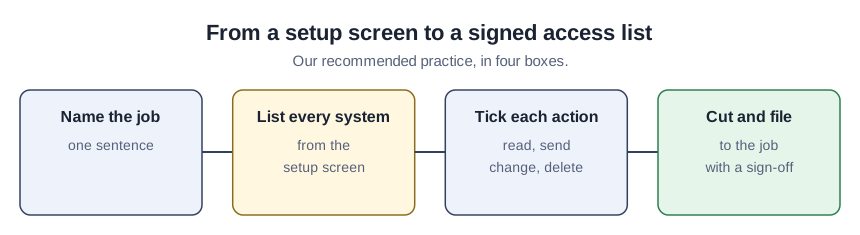
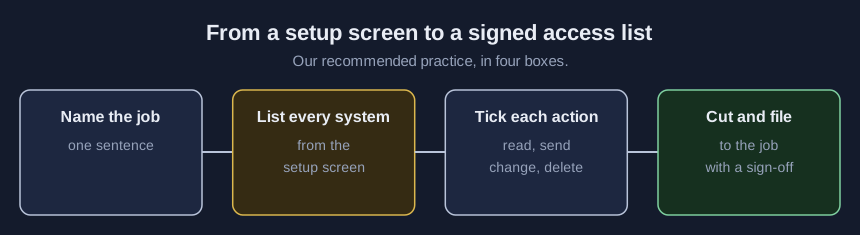
- Name the job in one sentence. “Send a reminder to members whose renewal is due in 30 days.” Everything on the list is judged against this sentence.
- List every system the agent would touch. Inbox, calendar, files, member database, payment tools, the web. Copy them from the setup screen, not from memory.
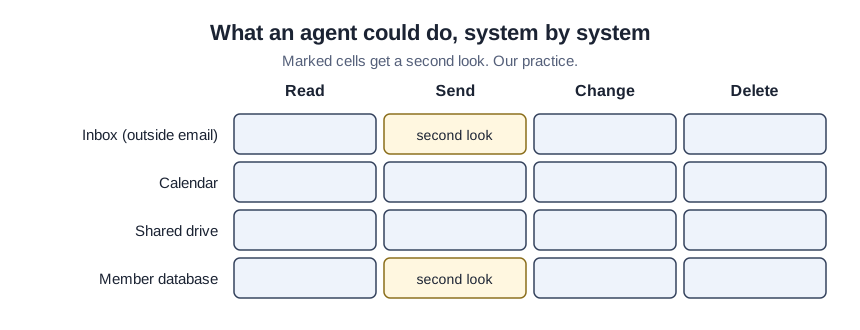
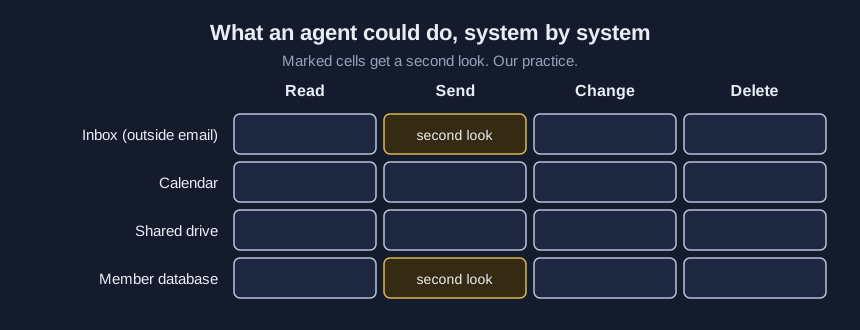
- For each system, tick read, send, change and delete. Send means anything that leaves the association: email, posts, forms. Write what the setup screen actually asks for, not what the job needs.
- Mark the risky combinations. An agent that reads outside text (incoming email, web pages) and can also send or delete is the one to look at hardest, because of agent hijacking, which our same-day article on what an AI agent is explains. Member records plus send is another.
- Cut the list to the job. For the example: the renewals inbox and calendar can go. The agent needs read access to renewal dates in the member database, not write access. Sending can stay, but drafts go to a person who presses send, at least at first.
- File the list where your security decisions live. CISA’s third recommendation is to “Account for agentic AI security in your organization’s security model and risk posture”. Our suggestion: the person who manages IT signs the list and it sits with your AI acceptable-use policy.
Before and after on the example
| System | Asked for | After the cut |
|---|---|---|
| Renewals inbox | Read, send | Not needed |
| Whole shared mail account | Read, send, delete | Send drafts only, a person approves |
| Calendar | Read, change | Not needed |
| Shared drive | Read, change | Not needed |
| Member database | Read, change | Read renewal dates only |
The agent still does its job. It can no longer read strangers’ email, rewrite member records or delete anything.
Check your list
- Every system on the setup screen appears on the list.
- Every tick traces back to the one-sentence job.
- No row combines reading outside text with sending or deleting unless a person approves each action.
- The person who manages IT has signed it.
- A date is set to look again when the vendor adds features.
Where an access list goes wrong
Listing what the job needs instead of what the screen asks for. The gap between the two is the finding.
Starting with member data. CISA’s advice is to begin with low-risk, non-sensitive uses. A renewals agent that drafts from a public dues schedule is a better first try than one inside the member database.
Treating the list as permanent. CISA names privilege creep among the risks. Re-run the list whenever the setup screen asks for something new.