Tutorial
BeginnerCheck a Member Test File for Identifiers Before You Try an AI Tool
Before a member export goes into an AI tool trial, remove the direct identifiers, keep the lookup table out, coarsen birth dates and ZIP codes, count the smallest group and deal with notes. Then grade each file STOP, FIX or PASS.
Time needed: About 20 to 30 minutes per test file
Before you start:
- The member export you plan to use, opened in a spreadsheet
- A note of what the AI tool trial actually needs the data for
AI Literacy Privacy Member Data Csv
When you finish, each test file you plan to hand to an AI tool will have a verdict: do not use it, fix it first, or it meets the rules below. The work starts after the name column is gone, where most checks end.
Try it now: the test file identifier check lab loads six practice cases, each holding six invented member test files, and marks every file STOP, FIX or PASS against five rules. The check runs on this page alone.
The two kinds of identifier
The method here is adapted from NIST’s report on de-identifying personal information, a 2015 internal report by Simson Garfinkel that summarizes the field. It is not a rule and does not bind associations. It also discusses HIPAA, which rarely covers associations, so HIPAA’s lists are left out.
The report splits identifiers into direct ones, which come out, and quasi-identifiers, which stay in some form. Mapping member columns onto that split is our adaptation, and so are the lab’s thresholds.
Walk one export from raw to ready
- List every column. Write down the header row first. This step is ours; it catches the column you forgot.
- Remove or replace the direct identifiers. NIST: “Examples of direct identifiers include names, social security numbers, and email addresses.” It goes further on record numbers and phones: “However, it is advisable to treat other individualized information such as medical record numbers and phone numbers as direct identifiers, even though additional information is required to link them to an identity, because these forms of identification are extensively used and thus available for linking to identities.” For an association, raw member IDs belong in this group, along with street addresses.
- Keep going. The report is direct about where early attempts ended: “Early efforts to de-identify data stopped with the removal of direct identifiers.”
- Mark the quasi-identifiers. NIST defines them: “Quasi-identifiers, also called indirect identifiers or indirectly identifying variables, are identifiers that by themselves do not identify a specific individual but can be aggregated and “linked” with other information to identify data subjects.” In a member file, look at birth date, ZIP code, gender, chapter, credential and join year. Choosing those columns is our reading, not NIST’s list.
- Generalize them. The report gives a ZIP example: “For example, the ZIP code 12345 could be generalized to a ZIP code between 12000 and 12999.” The lab asks for the first three ZIP digits and birth year instead of the full date. Both are teaching choices.
- Keep the lookup table out of the file. If you swapped member IDs for codes, the table that maps codes back to members undoes the swap. NIST warns: “Pseudonymization can be readily reversed if the entity that performed the pseudonymization retains a table linking the original identities to the pseudonyms, or if the substitution is performed using an algorithm for which the parameters are known or can be discovered.” A second tab in the same workbook counts as in the file.
- Count the smallest group. Pivot on the remaining quasi-identifiers and find the fewest rows sharing one combination. The report describes the idea as k-anonymity: a dataset meets it when every combination of quasi-identifier values is shared by at least k records. The lab uses 5 as its threshold, a teaching choice and not a standard.
- Deal with notes. Drop any free-text notes column, or read every note before the file goes anywhere. Notes can name people; this rule is ours.
- Run the file through the lab. Resolve each STOP before the trial starts.
Check each file against the lab’s rules
Rules are tried in a set order, and the earliest one that fits sets the verdict: R1 STOP for a direct identifier, R2 STOP for a lookup table, R0 FIX for a group size that is blank, negative or not a whole number, R3 FIX for a full birth date or five-digit ZIP, R4 FIX for a group under 5, R5 FIX for a notes column, and R6 PASS otherwise. The input check follows both STOP rules, so a file with names is never merely FIX.
The six practice cases
Every case uses the same six invented files at the Kettle Prairie Society of Records Managers, which is invented for practice: renewal survey, event registration, certification roster, chapter roster, dues history and member service log.
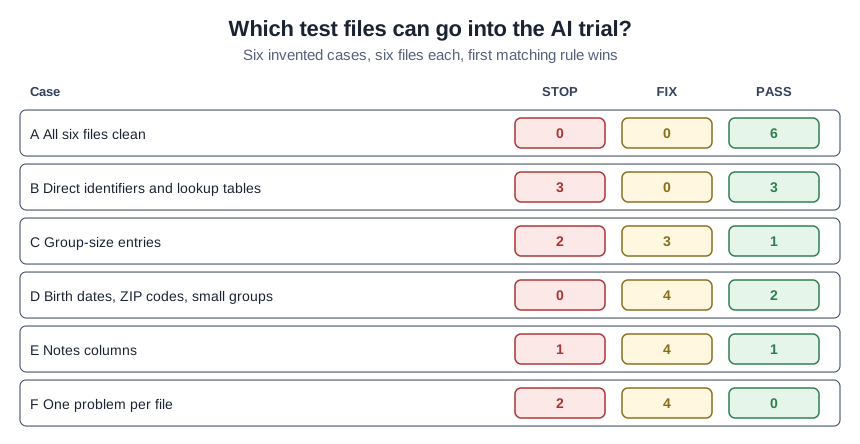
- Case A, all clean: all six files pass, two of them at a group of exactly 5.
- Case B, identifiers and lookup tables: 3 STOP, 0 FIX, 3 PASS.
- Case C, group-size entries: 2 STOP, 3 FIX, 1 PASS. A blank group and a group of −1 are FIX R0; a group of 0 is a real number and gets FIX R4; raw IDs with a blank group stop on R1.
- Case D, birth dates, ZIP codes and small groups: 0 STOP, 4 FIX, 2 PASS.
- Case E, notes columns: 1 STOP, 4 FIX, 1 PASS.
- Case F, one problem per file: 2 STOP, 4 FIX, 0 PASS.
Two mistakes that slip through
Keeping the member number. It is not a name, but the membership system can look it up.
Checking columns, not groups. Every column passes on its own while one combination still points to a single retired member in one chapter.
A PASS means the file meets these teaching rules. It does not make the file anonymous, and our article on why removing names does not make member data anonymous explains why. This is general information, not legal advice.