Tutorial
BeginnerCheck an AI-Made Member Draft for Reading Level, Headings, Link Text and Alt Text Before It Goes Out
Paste an AI-written member email or web page into a browser tool that lists sentence length, heading levels, vague link text and images without alt text, then fix what it flags and test the result on a few readers. The sample draft is invented.
Time needed: About 20 minutes for the first draft, 10 minutes for later ones
Before you start:
- An AI-made draft of a member email, web page or newsletter, saved as plain text, or use the sample draft
- A short description of who is on the list you are writing to
- Two or three colleagues or members willing to read the draft aloud (optional)
AI Literacy Accessibility Plain Language Communications
Picture this illustrative case: a membership coordinator has an AI-written renewal email with three section titles, a link that says “here” and one image, and wants to know whether it is ready for the list. By the end of this tutorial you will have run a draft through four checks, fixed what they flag, and kept a short log of what changed. The steps and their order are our recommended practice, because no source we found prescribes a checklist for AI drafts.
Try it now: the AI draft check lab runs in your browser with an invented sample draft already loaded. Nothing you paste leaves the page. The kit with the checklist and the sample is yours if you email ai@trihelix.co.
The example used throughout
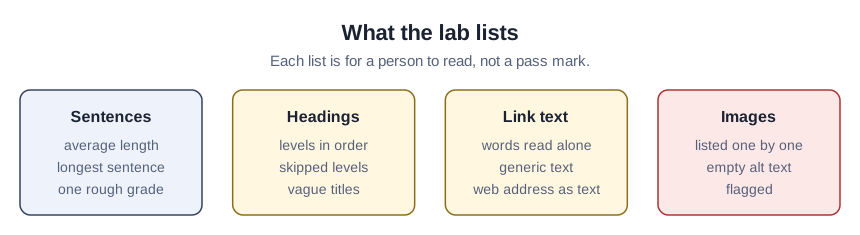
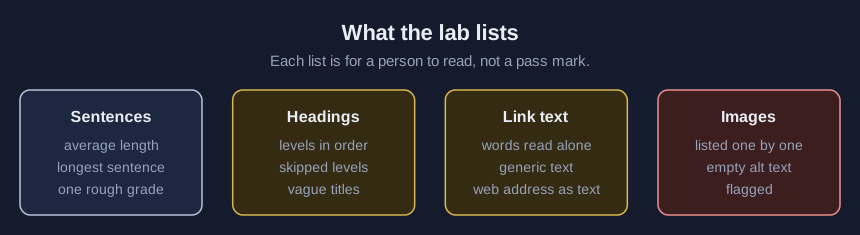
This is a teaching example, not a case study. The sample draft is invented for this tutorial and is not output from any product. It has a heading that jumps from level 1 to level 3, a heading titled “General,” a line reading “Click here” that the lab flags as a possible link, one link whose text is a web address, and one image with no alt text. The lab flags each of them.
Five steps
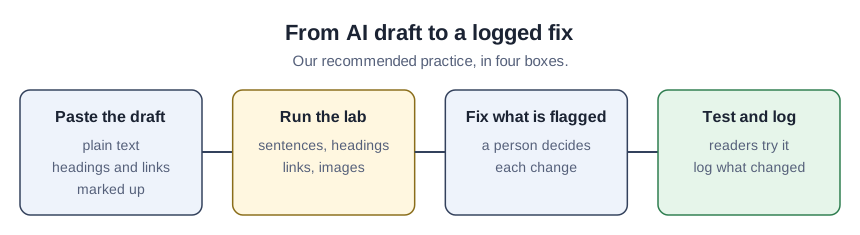
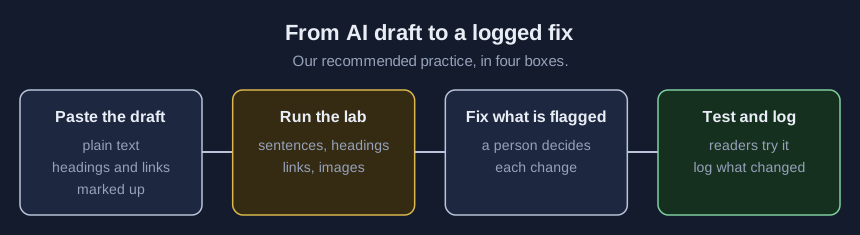
- Paste the draft into the lab as plain text. Mark headings with # signs and links as
[words](address). Keep your note about who is on your list outside the pasted text, because the lab counts every pasted line as part of the draft. - Read the sentence figures, then decide about reading level. The lab shows average and longest sentence length and one rough grade estimate. WCAG’s reading-level criterion, SC 3.1.5 at Level AAA, which we read as optional above AA, asks for text no more advanced than the lower secondary level, which W3C’s explainer defines as “Lower secondary education 7-9 years of school”. W3C also says its working group “could not find a way to test whether this had been achieved.” so the number is a stand-in. Compare the lab’s figures with the people on your list, not with a fixed grade, and for the ordinary sentence rules use our plain-language notice check.
- Check the headings. The lab lists them in order and flags skipped levels and vague titles. Digital.gov warns that “Topic headings such as “General,” “Application,” and “Scope” may confuse the user.” and says “Question headings are useful if you know what questions your audience will ask.”
- Read the links as a list. The lab lists every link’s words alone and flags generic wording and web addresses used as link text, which is our check. The Guidelines say “Make the link meaningful. Don’t use “click here” or “read more."" and “Be as explicit as you can. Too long is better than too short.”
- List the images. Alt text gets one line here: WCAG 1.1.1 (Level A) requires non-text content to have a text alternative, and our posts on checking captions and alt text and who checks AI alt text show how to write and check it.
One rule from the standards, one from us
For links, the two sources differ. W3C’s explainer says a “Read more” link can meet WCAG 2.4.4 (Level A) when the surrounding paragraph gives context, while the Guidelines say not to use “click here” or “read more” at all. We follow the stricter advice because the list is cheap to fix. Real heading levels in your email platform are a separate look from good heading wording, so check both.
Before and after on the sample
For the invented sample, the lab reports four sentences averaging 24.8 words with the longest at 45, one rough grade estimate of 13.0, a level 3 heading titled “General” after a level 1, a web address used as link text, a line reading “Click here,” and an image with no alt text. After a person fixes it, the sample would show a level 2 heading that names its topic, link words such as “the renewal rules,” the “Click here” line rewritten as a link that names its destination, a shorter longest sentence, and alt text someone has read.
Test the fix with readers
If the send is large, read the revised draft with a few people. The Guidelines’ paraphrase test uses “Conduct between 6 to 9 interviews” and asks the participant “to tell you in his or her own words what that section means,” because “wherever participants misunderstood the message, the document has a problem that you should fix.” The same page admits “it probably isn’t worth the time to test documents that go to a small number of people,” so for a short list use two or three readers as a judgment call. The Guidelines also say “Plan to test at least twice.”
Check the result
- You compared the sentence figures with your list and not with a fixed grade.
- The heading levels step down in order and survive the move into your template.
- You read each link’s words alone and none depends on the sentence around it.
- A person read the alt text for every image.
- The log records what changed and who looked.
Mistakes that spoil the result
Treating the lab’s grade as a pass mark. It is one rough estimate, and no source prescribes a limit.
Fixing the words but not the markup. A good title typed as bold text is still not a heading in the final template.
Sources (7)
- U.S. General Services Administration: Federal Plain Language Guidelines, Write effective links (archived copy of PlainLanguage.gov, GSA GitHub repository, commit fd76947; voluntary federal guidance)
- U.S. General Services Administration: Federal Plain Language Guidelines, Paraphrase testing (archived copy of PlainLanguage.gov, commit fd76947; voluntary federal guidance)
- U.S. General Services Administration: Federal Plain Language Guidelines, When to test (archived copy of PlainLanguage.gov, commit fd76947; voluntary federal guidance)
- U.S. General Services Administration, Digital.gov: Plain language guide series, Headings page (federal guidance for federal content, undated page)
- W3C: Web Content Accessibility Guidelines (WCAG) 2.2 (W3C Recommendation, 12 December 2024; voluntary standard)
- W3C Web Accessibility Initiative: Understanding SC 3.1.5 Reading Level (informative explanation, not required to meet WCAG)
- W3C Web Accessibility Initiative: Understanding SC 2.4.4 Link Purpose (In Context) (informative explanation, not required to meet WCAG)