Tutorial
BeginnerCheck Every Claim in an AI Answer Against the Retrieved Passages
Before a member sees an AI answer that cites your help pages, split it into claims, open the passage behind each one and mark it STOP, FIX or PASS.
Time needed: About 15 minutes per answer
Before you start:
- An AI answer to a member question that cites one or more of your pages
- Access to the passages or pages the tool retrieved
- A colleague who can send the final reply
AI Literacy Member Services Fact Checking Quality Control
When you finish, every sentence in an AI answer that a member could act on will be matched to the passage the tool retrieved, with a verdict for each one, and only the supported sentences will go out.
Try it now: our retrieved passage claim check lab offers six practice cases, each holding six claims from an AI answer about an invented association, and gives every claim a STOP, FIX or PASS against the retrieved passage shown. It runs in your browser and checks only what you enter.
Why a citation isn’t a check
The security community has a name for trusting a confident answer too quickly. OWASP’s list of risks for LLM applications, in its 2023/24 edition, gives it an entry of its own, LLM09 Overreliance, which opens: “Overreliance can occur when an LLM produces erroneous information and provides it in an authoritative manner.” A citation to your own help page makes an answer look more authoritative still, which is why it deserves the same scrutiny. In OWASP’s 2025 list, LLM09 is renamed LLM09:2025 Misinformation, which opens: “Misinformation from LLMs poses a core vulnerability for applications relying on these models.”
The same OWASP entry lists a common example that fits member help desks closely: “LLM provides inaccurate information as a response while stating it in a fashion implying it is highly authoritative.” It also warns that “When people or systems trust this information without oversight or confirmation it can result in a security breach, misinformation, miscommunication, legal issues, and reputational damage.” This isn’t legal advice.
Seven steps from draft answer to sent reply
- List the claims. Break the AI answer into claims a member could act on: a number, date, fee, window, eligibility rule or named process. Two facts in one sentence make two claims.
- Find the passage for each claim. Open the passage or page the tool used. If it hides the passage, open the cited page yourself. Don’t ask the same tool whether it was right.
- Look for a conflict first. If the passage says the opposite (the passage says a freeze doesn’t apply to unpaid prior-year balances, the answer says it wipes them), the claim is a conflict. Mark it STOP.
- Look for invented detail next. If the claim adds a number, date, name, fee, window or rule that the passage never states, mark it STOP, even when the rest is accurate. A freeze of 180 days when the passage says up to 90 is an invented number. A claim can be both a conflict and an invention; the conflict check comes first, so it’s marked as a conflict.
- Grade what’s left by support. If only part of the claim is in the passage, mark it FIX and narrow the sentence. If none of it is, mark it FIX and either cut it or find a passage that does support it.
- Rewrite until everything passes. Change or cut each STOP and FIX, then check the new wording against the passage again. A claim passes only when the passage fully supports it and it adds nothing.
- Have a person send it. OWASP’s guidance includes “Regularly monitor and review the LLM outputs.”
Treating invented detail as STOP and a bare unsupported claim as FIX are our teaching choices, and so is the order of the checks. OWASP’s LLM09 Overreliance entry supports review and oversight; it doesn’t prescribe these labels.
One answer, checked
The Invented Glassford League of Chapter Administrators gets a member question about pausing dues during parental leave. This is a teaching example, not a case study. Its help bot drafts a reply and cites the dues freeze FAQ, which says: “A chapter may request a one-time dues freeze for a member who is on parental leave. The freeze lasts up to 90 days. The chapter chair submits the request in the member portal. Freezes do not apply to unpaid prior-year balances.”
Here is the example draft, split into claims, with our verdicts:
| Claim from the answer | What the passage says | Verdict |
|---|---|---|
| Your chapter can request a one-time dues freeze while you’re on parental leave. | A chapter may request it for a member on parental leave. | PASS |
| The freeze can last up to 180 days. | Up to 90 days. | STOP: invented detail |
| The freeze also clears any unpaid balance from last year. | Freezes do not apply to unpaid prior-year balances. | STOP: conflict |
| Your chapter chair submits the request in the member portal. | The chapter chair submits it in the member portal. | PASS |
| Most members use the freeze for the full period. | Nothing on this. | FIX: unsupported |
The sent reply keeps the two PASS claims, corrects the window to 90 days, drops the other two and goes out from a staff member.
Check your work in the lab
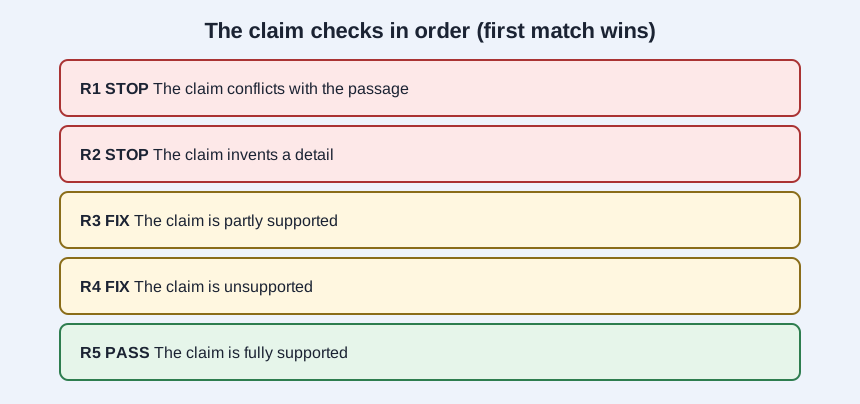
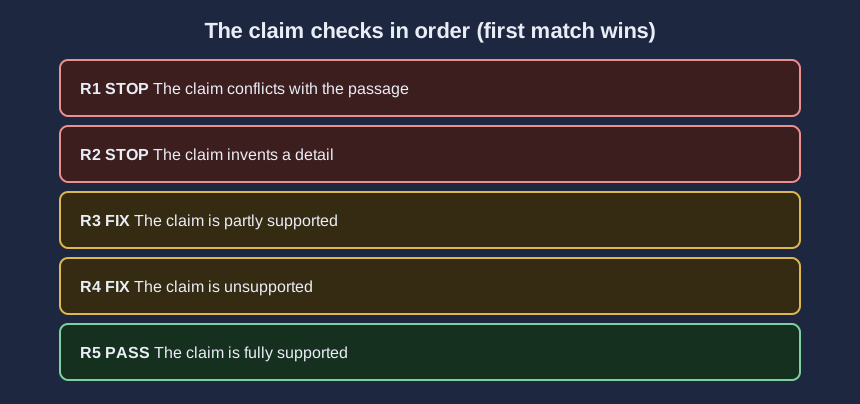
The lab applies the same checks in a fixed order, and the first rule that matches decides: R1 STOP for a conflict, R2 STOP for an invented detail, R3 FIX for partial support, R4 FIX for no support, and R5 PASS for full support. Load each case, decide each claim’s verdict before you read the results table, then change the marks to see how the verdict moves. Thirteen claims across the cases match more than one rule, and the earlier rule decides each one.
| Case | Theme | STOP | FIX | PASS |
|---|---|---|---|---|
| A | All fully supported | 0 | 0 | 6 |
| B | Invented details | 3 | 2 | 1 |
| C | Contradictions | 4 | 1 | 1 |
| D | Partial support | 2 | 3 | 1 |
| E | Unsupported claims | 2 | 3 | 1 |
| F | One problem per claim | 2 | 2 | 2 |
Across all 36 claims that’s 13 STOP, 11 FIX and 12 PASS.
A PASS in the lab means the claim matches the practice passage shown. The lab doesn’t call an AI tool or open any real page.
Where this check slips
Letting a nearby passage stand in. A chapter policy next to the national one may state a different window. Match the claim to the passage that governs it.
Fixing the sentence but not the source. If the same wrong line keeps coming back, an old page is probably still being searched. Retire it or correct it.