Tutorial
BeginnerCheck Every Question in a Member Survey Draft Before Anyone Is Invited
Save a draft member questionnaire as one CSV file, run it through a browser lab that lists questions to reread (two questions in one, negatives, agree/disagree scales, missing or overlapping options), decide what to change, then try the revised questions on a few members.
Time needed: About 30 minutes for the check, plus time to try the revised questions on a few members
Before you start:
- A draft member survey whose questions are written but not yet sent, or use the sample files
- A spreadsheet program to save the questions as CSV in the blank template
- A recent desktop browser
- Two or three members like the ones you will survey, willing to try the draft
Surveys Member Research Data Quality Membership Csv
This tutorial runs one draft member survey through a wording check while the questions can still change. You finish with a short list of questions to reread, a decision logged for each, and a trial of the revised wording on a few members.
Try it now: the survey wording check reads a draft questionnaire saved as CSV and lists questions worth a second look, all inside your browser tab.
Four sources on how a question goes wrong
Pew Research Center’s guide to writing survey questions warns that even small wording differences can substantially affect the answers people provide. Its rules: ask only one question at a time, avoid double negatives because they can result in respondent confusion, and give closed questions options that are exhaustive and mutually exclusive. Pew also asks writers to consider whether certain words may be viewed as biased or potentially offensive to some respondents.
On agree/disagree scales, Pew describes an acquiescence bias, and experiments by Saris and colleagues published in 2010 found those answers had much lower quality than answers to questions whose options name the thing asked about, such as “Very easy” to “Very difficult”. The same paper found that people make more cognitive errors when they have to disagree with a negative statement.
Cynthia Simpson, CAE, of the National Society for Histotechnology, told Associations Now in 2021 that offering too many answer options for a multiple-choice question reduces respondents’ ability to focus on what you’re asking. Pew’s own guidance is four or perhaps five at most, yet it allows more categories for factual and demographic questions, so the lab’s options limit starts empty.
None of these sources measures how often association surveys go out with wording problems, or whether a wording check changes the answers that come back.
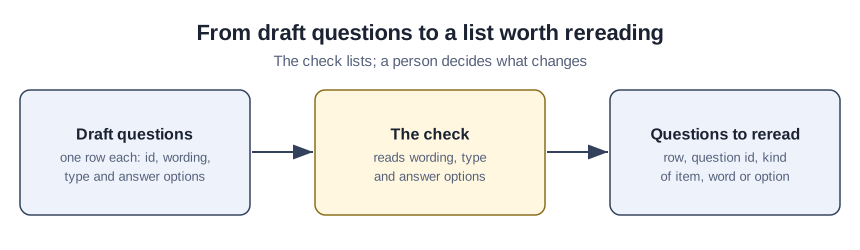
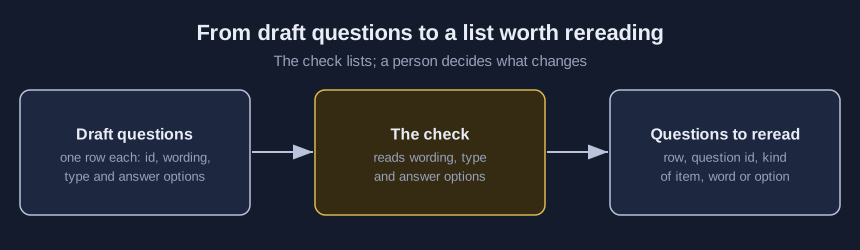
Run the draft through the check
- Copy each draft question into the blank template, one row per question, with its id, wording, type (single, multi, scale or open) and options, putting a | between options.
- In the lab, change the names under “Column names in your file” if your headers differ.
- Under “Your word lists and limit”, type the loaded words your own drafts tend to use.
- Type a most-options limit only if your team has settled on one.
- Choose your file under “Your questionnaire”; the check runs as soon as it loads.
- Read each listed question aloud and pick keep, reword, split or add an option.
The join-word, negative-word, agree and way-out lists are the tool’s own starting lists, and you can edit all of them. Four checks are also the tool’s own choices rather than research findings: a missing way-out option such as Other, a scale with more steps on one side, a repeated option and a repeated question id.
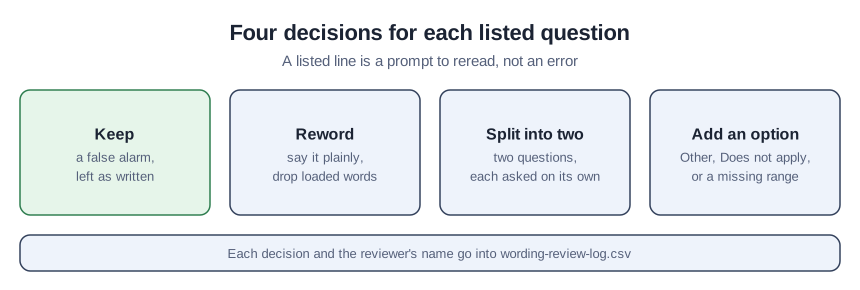
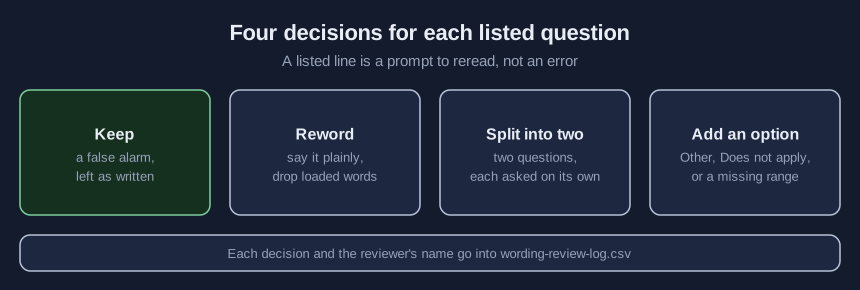
- Write each decision and the reviewer’s name in wording-review-log.csv.
- Try the revised questions on a few members like the ones you will survey.
One invented member survey, read row by row
This is a teaching example, not a case study. The lab’s “Open the sample with problems” button loads an invented draft that starts like this:
question_id,question_text,type,options
Q1,How satisfied are you with the journal and the webinars?,scale,Very satisfied|Satisfied|Neither satisfied nor dissatisfied|Dissatisfied|Very dissatisfied
Q2,Do you agree that the dues increase was obviously necessary?,scale,Strongly agree|Agree|Neither agree nor disagree|Disagree|Strongly disagree
Q3,Our mentoring program is not hard to join.,scale,Strongly agree|Agree|Neither agree nor disagree|Disagree|Strongly disagree
Q4,Should members who don't renew never lose access to past webinars?,single,Yes|No|Not sure
Q5,How many staff work at your organization?,single,1-10|10-50|51-200|201 or more
Q6,How many association events did you attend in the past two years?,single,0|1-2|4-6|7 or more
Q7,Which region do you work in?,single,Northeast|Southeast|Midwest|West
In this example output, Q1 is listed because “and” joins two services in one satisfaction question, so it should split. Q3 gets two lines, a negative statement on an agree/disagree scale; asking how easy the program is to join fixes both. Q4 pairs “don’t” with “never”. Q5’s ranges both hold 10, Q6 has no option for 3 events, and Q7 offers no Other. Further down, Q15 is listed for the “and” in a committee’s name, a false alarm to keep as written.
Verify the lab, then hear from members
Press “Put in example settings, all made-up practice values” with the sample open. Q2 and Q11 each gain a loaded-word line, and Q9 goes over the limit of seven. Empty the loaded-word box and press “Run the check” again: both loaded-word lines should vanish, because an empty list switches that check off.
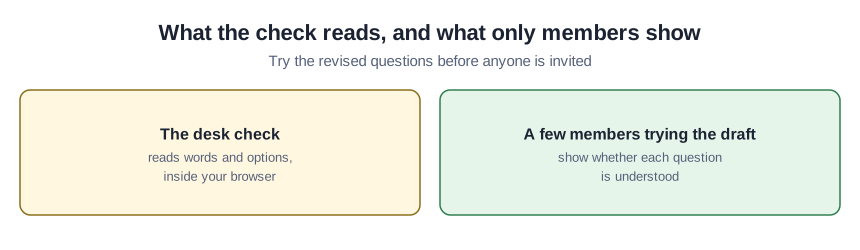
The list cannot say whether members understand a question. The Census Bureau’s quality standard requires the Bureau’s own new questionnaires to be pretested with respondents who are in scope, and states that methodological expert reviews generally do not satisfy this pretesting requirement. The kit’s starter questions for that trial:
- In your own words, what is this question asking?
- Was there an answer that fit you? If not, what would you have picked?
- Did any word make you feel there was a right answer?
- Was any question really two questions?
- Where did you slow down or reread?
Wording mistakes that survive a clean list
- Splitting a question only because “and” appeared in it.
- Leaving the loaded-word list empty, then reading a clean result as proof of neutral wording.
- Capping a factual list, such as job titles, at Pew’s four or five.
- Trusting answer order, which the lab never checks and which Pew says can influence how people respond.
- Hinting at a new member benefit, phrasing that Simpson told Associations Now can raise expectations the association then has to meet.
What comes in the survey wording kit
The kit holds the lab page to run offline, the check script, both sample questionnaires, the blank template, a step list, the review log and the trial questions above. Email ai@trihelix.co for it.
Sources (4)
- Pew Research Center: Writing Survey Questions (methods page, undated, read October 7, 2026; nonprofit research center's wording rules)
- U.S. Census Bureau: Statistical Quality Standard A2, Developing Data Collection Instruments and Supporting Materials (last revised December 16, 2021; the Bureau's requirement for its own surveys, not a rule for associations)
- Saris, Revilla, Krosnick and Shaeffer: Comparing Questions with Agree/Disagree Response Options to Questions with Item-Specific Response Options (Survey Research Methods 4(1), 2010; peer-reviewed experiments in European Social Survey rounds)
- Associations Now (ASAE): Four Language Pitfalls Associations Should Avoid in Member Surveys (March 19, 2021; association-press article quoting one member-services manager, not research)