Tutorial
BeginnerCheck Your robots.txt Lines Before You Count on Them With AI Crawlers
Read your association's robots.txt line by line: crawler names, groups, paths and private pages. Then grade each planned line STOP, FIX or PASS before you tell anyone AI crawlers are handled.
Time needed: About 20 minutes
Before you start:
- Your website's address, so you can open its robots.txt in a browser
- The lines you plan to add, written out one per row
- A list of the pages staff think of as private, and whether each needs a member login
AI Literacy Websites Member Data Web Basics
By the end, every line you plan to put in robots.txt for AI crawlers will have a verdict, and you’ll know which of your private pages still need a member login before any line can matter.
Try it now: our AI crawler rule check lab walks through six practice cases, each six planned robots.txt lines for an invented association, and grades each line STOP, FIX or PASS. Everything happens inside your browser, and it looks only at the lines you type.
The rulebook behind the checks
The format rules here come from RFC 9309, the Robots Exclusion Protocol published by the IETF, the standards body that maintains many of the internet’s basic rules. It’s worth reading one line from it before anything else: “These rules are not a form of access authorization.” Everything below is about writing requests well. None of it locks a page.
Six steps through the file
- Open the live file. Type your site’s address followed by /robots.txt into a browser. RFC 9309 says “The rules MUST be accessible in a file named “/robots.txt” (all lowercase) in the top-level path of the service.” If nothing loads, crawlers have no rules from you yet.
- Check every crawler name. Each group starts with a user-agent line naming a crawler. The IETF standard is strict about the characters: “The product token MUST contain only uppercase and lowercase letters (“a-z” and “A-Z”), underscores (”_”), and hyphens (”-”).” A name with a space, a slash, a dot or a version number doesn’t fit. The standard also allows "" for every crawler, and a crawler with no group of its own follows that one: “If no matching group exists, crawlers MUST obey the group with a user-agent line with the "" value, if present.” Name matching ignores capital letters.
- Check that every rule sits in a group. A disallow or allow line pasted above the first user-agent line belongs to no one. RFC 9309 says “The crawler SHOULD ignore “disallow” and “allow” rules that are not in any group (for example, any rule that precedes the first user-agent line).”
- Check every path. In the standard’s grammar a path begins with a slash:
path-pattern = "/" *UTF8-char-noctl. Write “/journal/”, not “journal/”. An empty path matches no page, so by the next rule it blocks nothing; that’s our reading of the standard. Where two rules match, “The most specific match found MUST be used,” so a longer allow line can open one folder inside a disallowed one. And if nothing matches, the standard is clear: “If no match is found amongst the rules in a group for a matching user-agent or there are no rules in the group, the URI is allowed.” Path matching should treat capital letters as different. - Take private pages out of the plan. For each page staff call private, ask whether it needs a member login. If it doesn’t, stop: add the login first, because “The Robots Exclusion Protocol is not a substitute for valid content security measures.” If it does, leave it out of robots.txt anyway. RFC 9309 warns that “Listing paths in the robots.txt file exposes them publicly and thus makes the paths discoverable.” Leaving guarded pages out entirely is our teaching choice.
- Run your lines through the lab. Enter each planned line, settle every STOP, then every FIX.
One worked example
The Invented Riverbend Association of Map Librarians wants AI crawlers to skip its journal archive and print pages. This is a teaching example, not a case study. After the checks, its planned lines read:
User-agent: InventedTrainBot
Disallow: /journal/archive/

User-agent: Invented_Answer-Bot
Disallow: /journal/archive/

User-agent: *
Disallow: /print/
Every name uses only letters, underscores and hyphens, every rule sits under a user-agent line, and every path starts with a slash. The member directory isn’t in the file at all; it sits behind the association’s member login.
Check your work in the lab
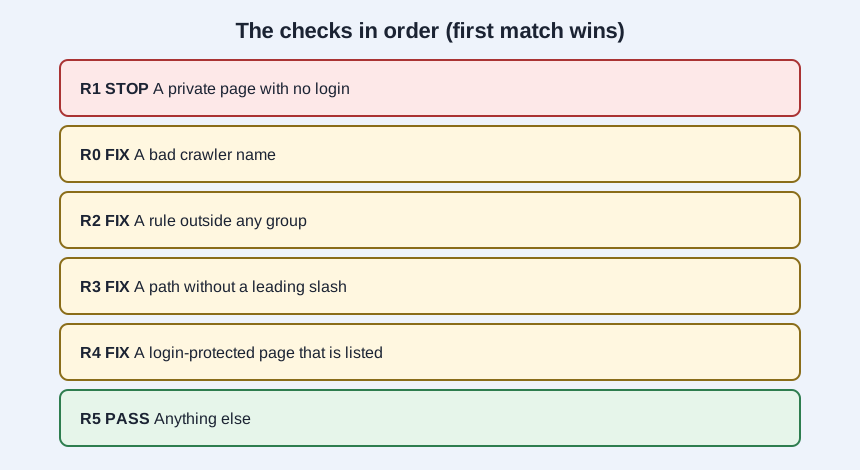
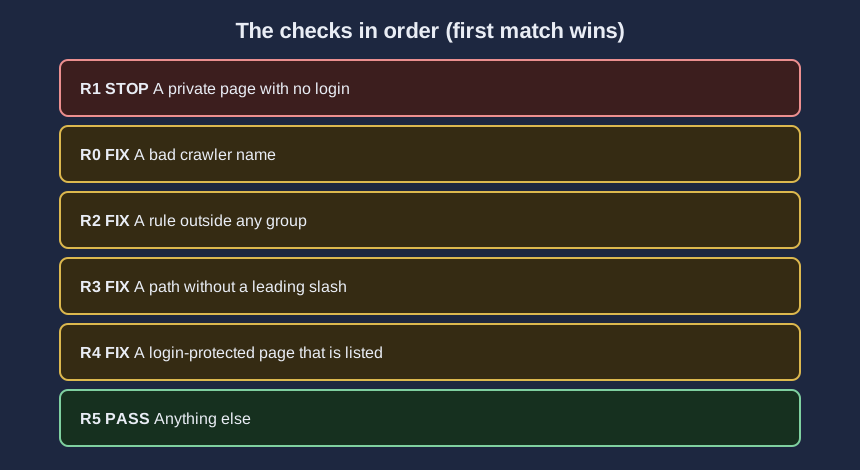
The lab tries its rules in a fixed order, and the first match wins: R1 STOP for a private page with no login, R0 FIX for a crawler name outside the allowed characters, R2 FIX for a rule outside any group, R3 FIX for a path without a leading slash, R4 FIX for a listed page that already has a login, and R5 PASS otherwise. Its six cases come out like this:
- Case A, all six lines clean: 0 STOP, 0 FIX, 6 PASS, including an empty path and a lowercase name.
- Case B, private pages: 2 STOP, 2 FIX, 2 PASS. Two pages with no login stop; two with a login are FIX for being listed.
- Case C, crawler names: 1 STOP, 3 FIX, 2 PASS. A blank name, one with spaces and one with a version number are FIX; an unguarded private page stops even though its name is also wrong.
- Case D, rules outside any group: 0 STOP, 5 FIX, 1 PASS.
- Case E, paths: 1 STOP, 2 FIX, 3 PASS.
- Case F, one problem per line: 1 STOP, 4 FIX, 1 PASS.
A PASS means the line is well formed. It doesn’t mean a given crawler will obey it, and the lab never visits a real site.
Where these lines quietly fail
Copying a name with its version. “InventedTrainBot/2.0” looks official and matches nothing the standard allows.
Pasting rules above the first user-agent line. They read like they apply to everyone and apply to no one.
Listing the members area to be safe. It tells anyone reading the file where the private pages are, and it doesn’t keep out a crawler that skips the file.