Tutorial
BeginnerLook Up Your Own Job's Task List in O*NET Before Deciding Where AI Fits
Find your occupation in O*NET, the free Labor Department-sponsored occupation database, copy its task list, and sort each task into try with AI, check closely, or keep human. The sorting is our recommended practice; O*NET says nothing about AI.
Time needed: About 25 minutes for one role
Before you start:
- Your job title and a one-line description of what you do
- A browser to open O*NET OnLine (free, no account needed)
- A colleague in the same role to compare sorts with (optional)
AI Literacy Workforce Events Professional Development
Picture this illustrative case: an association’s meetings manager is told to “find ways to use AI” before next year’s annual conference, and starts by guessing at tasks from memory. By the end of this tutorial you will have a written task list for your own role, taken from a public occupation database, with each task sorted into one of three groups: try with AI, check closely, or keep human. The three groups and the steps are our recommended practice. No source here says which tasks suit AI.
Try it now: the O*NET task sort lab runs in your browser with five tasks from the event planners’ profile already loaded. Paste your own list, sort it, and copy the result. Nothing you paste leaves the page. The worksheet is yours if you email ai@trihelix.co.
Why start from O*NET
O*NET describes itself plainly: “The O*NET Program is the nation’s primary source of occupational information.” It is “developed under the sponsorship of the U.S. Department of Labor/Employment and Training Administration (USDOL/ETA)”, and “The O*NET database is publicly available at no cost and is continuously updated using a wide variety of sources and methodologies.” (O*NET Overview).
Its model says “Every occupation requires a unique mix of knowledges, skills, abilities, activities, and tasks”. The tasks are the useful part here. A list written by someone else is less likely to skip the dull, recurring work where a tool might help, or the judgment calls where it should not.
As of 22 October 2026, the overview counts “over 900 occupation profiles” and says “more than 19,000 task statements are linked to over 2,000 detailed work activities”. Those counts move: “Updated quarterly, the O*NET Database ensures the most current occupational information is available.” Note the date you read your profile.
Five steps
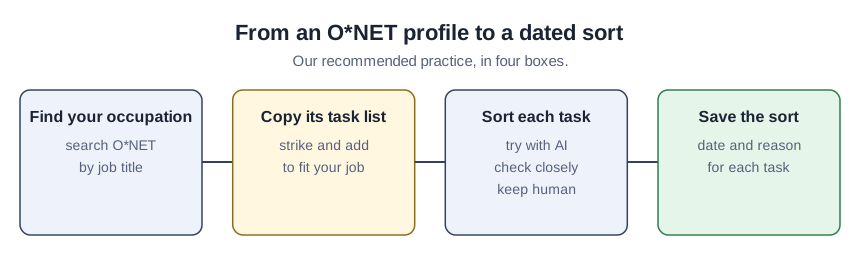
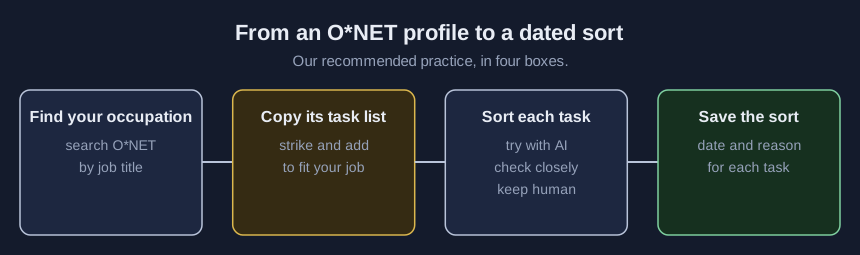
- Find your occupation. Search O*NET OnLine by your job title. Association titles often do not match one occupation neatly, so open two or three close profiles and pick the one whose summary sounds most like your week.
- Copy the task list. Paste the tasks into the lab, one per line, and add the profile code and today’s date.
- Strike tasks you do not do and add ones you do. O*NET describes occupations nationally, not association jobs. Your list should describe your job.
- Sort each task into one of three groups. Try with AI: drafting or organizing where a person checks the result. Check closely: work with numbers, money or facts members rely on. Keep human: relationships, negotiation and final decisions. These groups are ours, and two careful people may sort the same task differently.
- Save the sort with a date and a reason. One line per task on why it went where it did. Re-sort when the profile or your tools change.
Worked example: meeting and event planners
The profile for 13-1121.00 Meeting, Convention, and Event Planners summarizes the job as “Coordinate activities of staff, convention personnel, or clients to make arrangements for group meetings, events, or conventions.” One of its listed tasks names associations outright: “Promote conference, convention and trades show services by performing tasks such as meeting with professional and trade associations, and producing brochures and other publications.”
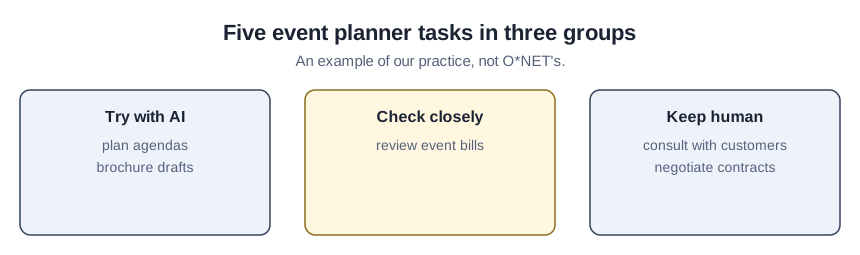
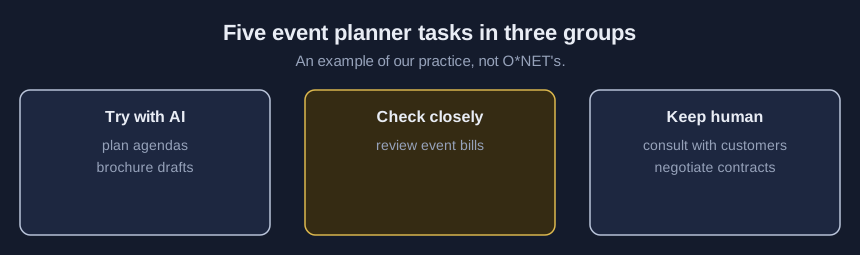
Here is how a meetings manager at a trade association might sort five tasks from that profile. The sort is an example of our practice, not O*NET’s.
| O*NET task (as written) | Our example sort | Reason |
|---|---|---|
| “Consult with customers to determine objectives and requirements for events, such as meetings, conferences, and conventions.” | Keep human | The conversation is the work; a tool could help draft questions beforehand |
| “Plan and develop programs, agendas, budgets, and services according to customer requirements.” | Try with AI | A first agenda draft from your own notes, edited by you |
| “Review event bills for accuracy and approve payment.” | Check closely | Money; any tool output is a starting check, and a person approves |
| “Negotiate contracts with such service providers and suppliers as hotels, convention centers, and speakers.” | Keep human | Negotiation and signature stay with staff |
| “Promote conference, convention and trades show services by performing tasks such as meeting with professional and trade associations, and producing brochures and other publications.” | Try with AI (brochure drafts only) | Meetings stay human; draft copy gets a person’s edit |
Check your sort
- Every task has a group and a one-line reason.
- Nothing involving money, member records or a signature sits in try with AI without a named checker.
- The profile code and the date you read it are on the sheet.
- A colleague in the same role sorted the list and you discussed every disagreement.
Where a task sort goes wrong
Sorting the profile instead of your job. A national occupation list is a starting point. Leave in tasks you never do and the sort tells you nothing.
Reading the sort as permission. A task in try with AI still needs your association’s tool rules. Our article on the Labor Department’s AI literacy framework covers what checking and responsibility mean for each worker.
Never re-sorting. O*NET updates quarterly and tools change faster. Put a date on the sheet.