Tutorial
BeginnerMark Every Time-Sensitive Claim in an AI Answer and Check the Current Page
Take an AI answer you plan to send to members, mark every claim that can expire, check each one against the official page and its last-updated date, and add an 'as of' date to every line that survives.
Time needed: About 10 minutes
Before you start:
- An AI answer you plan to reuse with members
- Access to the official pages that own each answer, such as your handbook, bylaws or a state board's site
- Today's date
AI Literacy Member Services Communications Fact Checking
You have an AI answer about dues, deadlines or rules, and it is about to go to a member. By the end of this tutorial you will have marked every claim in it that can expire, checked each one against the official page and that page’s last-updated date, and added an “as of” date to every line you keep.
Try it now: the time-sensitive claim check lab lists the claims from an AI answer and asks what the official page says, when that page was last updated, and when you checked. It gives each claim a PASS, FIX or STOP, suggests the line to put in your draft with an “as of” date, and builds a plain-text record. The answers and the Lakeshore Society of Dental Assistants are invented for the lab; none is output from an AI tool.
Why the date matters
Researchers at The University of Texas at Austin, in SituatedQA, start from a plain observation: “Answers to the same question may change depending on the extra-linguistic contexts (when and where the question was asked).” Testing research question answering systems in 2021, they found that models “fail to generalize to answering questions asked in the present, even when provided with an updated evidence corpus (a roughly 15 point drop in accuracy).” Those were 2021 models, not today’s tools, but the lesson holds.
Mark and check each claim
- Split the answer into claims. One fact per line.
- Label each claim’s type. Use deadline or date, fee or amount, rule or requirement, person in a role, count, law or regulation, or not time-sensitive.
- Find the page that owns each answer. Your handbook, fee schedule or the regulator’s own page, not a news story.
- Compare the wording. Note whether the page matches the claim, differs from it, says nothing about it, or does not exist.
- Record two dates. Write the page’s last-updated date and the day you checked it.
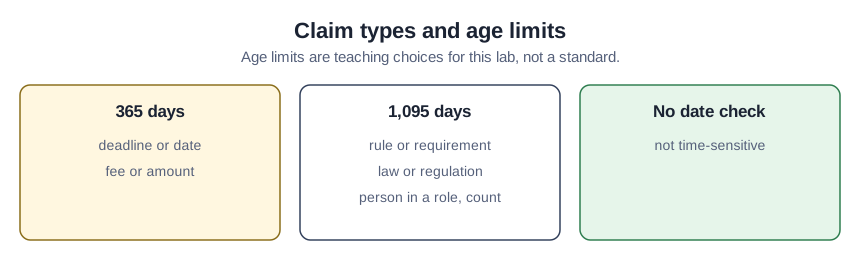
- Apply an age limit. The lab uses 365 days for deadlines and fees and 1,095 days for rules, laws, people and counts. The age limits are teaching choices for this lab, not a federal or legal standard.
- Date every line you keep. Add “as of” and the day you checked, in parentheses, so the reader knows how fresh it is.
Federal agencies offer a useful model here, though it binds them, not associations. OMB memo M-23-22 warns that “content can easily become outdated or abandoned over time without strong internal agency controls to ensure that information is timely and accurate.” It asks that content not actively maintained “be reviewed no less than once every three years,” and encourages agencies to publish a “last updated date, next review date, author or program owner” on each page, because “Time-and-date stamps provide transparency to the user and help the public better understand the freshness of content.”
Worked example: Renee’s answer
This is case B in the lab, and everything in it is invented. Renee Okafor, membership coordinator at the Lakeshore Society of Dental Assistants, asked an AI tool about renewal and got this sample answer:
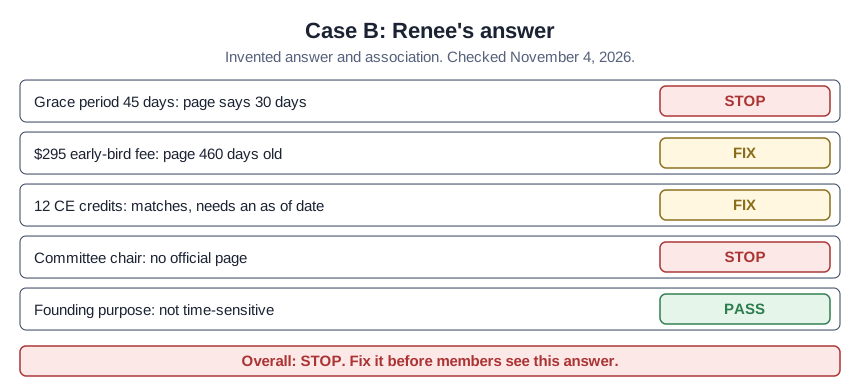
“The renewal grace period is 45 days. Early-bird registration for the 2027 Annual Meeting is $295. The CE requirement is 12 credits every two years. Dana Whitfield chairs the Education Committee. LSDA was founded to support dental assistants.”
She checked on November 4, 2026.
| Claim | Result | What the lab says |
|---|---|---|
| 45-day grace period | STOP | “Claim 1: the official page says 30 days. The AI answer is out of date. Use the page’s wording and date it.” |
| $295 early-bird fee | FIX | The fee page was last updated 460 days before she checked, past the 365-day limit. |
| 12 CE credits | FIX | It matches a page updated June 30, 2026, but her draft has no “as of” date yet. |
| Committee chair | STOP | “Claim 4: no official page confirms this. Remove it or find the page that owns the answer.” |
| Founding purpose | PASS | Not time-sensitive. |
The overall result is “At least one claim is out of date or unconfirmed. Fix it before members see this answer.” The line the lab suggests for claim 1 is “30 days (as of November 4, 2026).” The fee needs a call to the meetings team before it goes out.
Check your result
- Every claim in your draft has a type.
- Every time-sensitive claim points to an official page, or has been removed.
- Every kept claim matches its page and carries an “as of” date.
- No page’s last-updated date falls after the day you checked it, and any page past its age limit has been confirmed with its owner.
Where a freshness check goes wrong
Trusting a page with no date. A page that shows no last-updated date may be current or years old. Ask its owner and note who confirmed it.
Treating a silent page as a yes. If the page does not mention the claim, the AI answer is still unconfirmed.
Dropping the date when you paste. The “as of” date is what tells the next reader when to check again.