Tutorial
BeginnerMatch Each Testing Accommodation to Your Remote Exam's Monitoring Rules
List every candidate with an accommodation for the next remote sitting, check timing, setup, flags and the score report, and sort each row.
Time needed: About 45 minutes for one exam sitting, plus the six practice cases
Before you start:
- The accommodation request log for the next remote sitting
- The proctoring settings, or the vendor contact who knows them
- A sample score report
- A browser to run the lab
AI Literacy Certification Accessibility Operations
By the end of this tutorial you will have one page for the next remote sitting: every candidate with an approved or pending accommodation, whether the request was answered in time, whether documents stayed limited to the need, whether the accommodation is set up in the remote exam or an alternative was offered, whether it could set off an automated flag and reviewers know, what happens if the face check fails, whether any flag is acted on without a person, and whether the score report is marked, with a STOP, VERIFY or PASS beside each row.
Try it now: the remote exam accommodation check lab lists six candidates with accommodations for one remote sitting at a certification board that does not exist. Open a blank form or pick a practice case; the page re-sorts each row as the fields change. Nothing you enter leaves the browser. These are invented examples, for practice only. Not legal advice.
The guidance and the regulation behind the checks
The checks draw on the Justice Department’s guidance on testing accommodations (last updated February 28, 2020) and on 28 CFR 36.309. The Justice Department page is informal guidance. Only the lines that trace to 28 CFR 36.309 itself are U.S. federal law. We chose the rules and their order for teaching, and two rules are ours.
Under the Justice Department’s guidance on testing accommodations, exams for licensing, certification or credentialing for professional or trade purposes are covered by the ADA, and testing accommodations must be provided. A marked score report annotates a score to show the exam was taken with an accommodation. An automated flag is a proctoring alert about behavior during the exam. The lab keeps those in separate fields. If you are tracking event registration requests rather than exam accommodations, our October 16 walkthrough covers that list.
Nine steps for one remote sitting
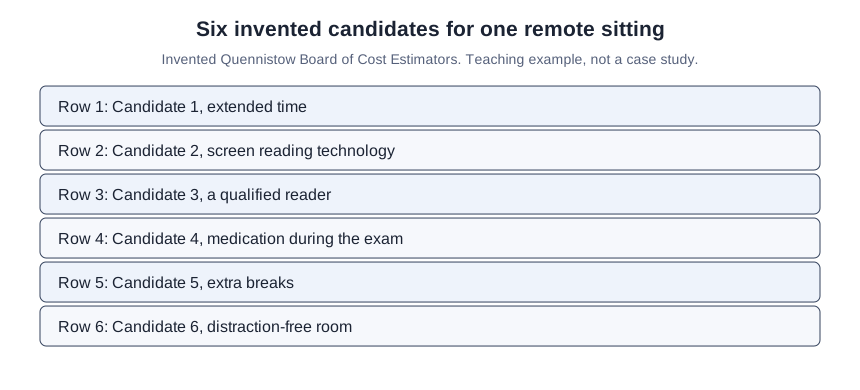
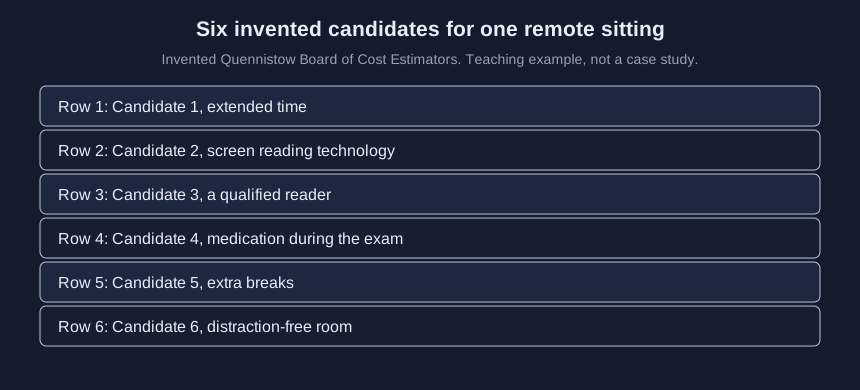
- List every candidate with an approved or pending accommodation for the next remote sitting. Examples in the Justice Department guidance include screen reading technology, extended time, distraction-free rooms and medication during the exam, and the regulation names qualified readers.
-
Check each request was answered in time to register and prepare. 28 CFR 36.309 says the entity responds in a timely manner, and the Justice Department says the answer should come in time to register and prepare, with no earlier deadline for those asking for accommodations. No answer before registration closes is a STOP under R1.
-
Check what documents were asked for. 28 CFR 36.309 says any request for documentation has to be reasonable and limited to the need for the accommodation requested. The Justice Department says proof of past testing accommodations is generally sufficient, and that testing entities should defer to a qualified professional’s assessment. Asked for more than the request needs is a STOP under R2.
-
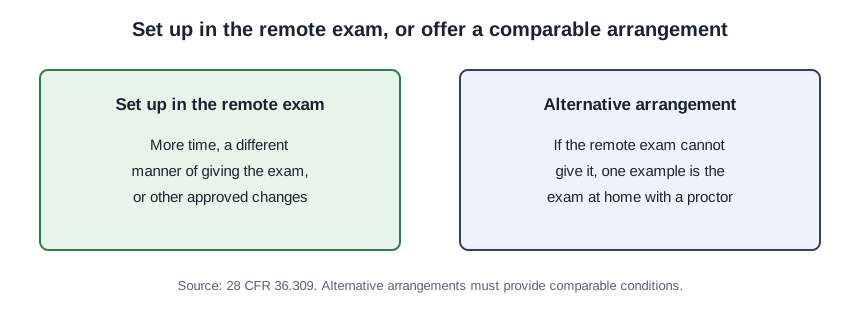
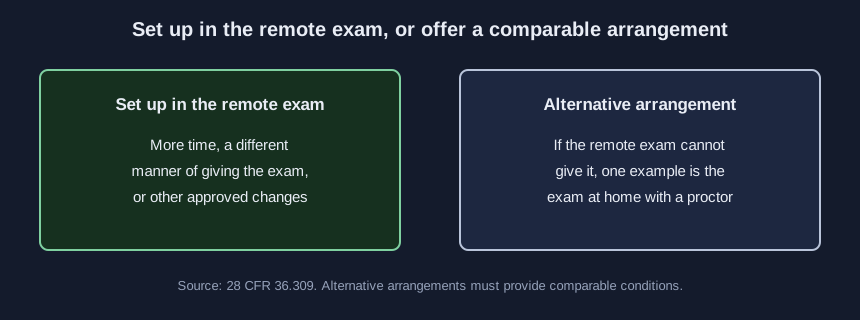
For each accommodation, confirm it is set up inside the remote exam. The same regulation says required changes can include more time and a different way of giving the exam. Approved but not set up yet is a VERIFY under R6. If the remote exam cannot give an accommodation, the same regulation gives an exam at the candidate’s home with a proctor as one example of an alternative arrangement, and says alternative arrangements must provide comparable conditions. Cannot be given, with none offered, is a STOP under R3.
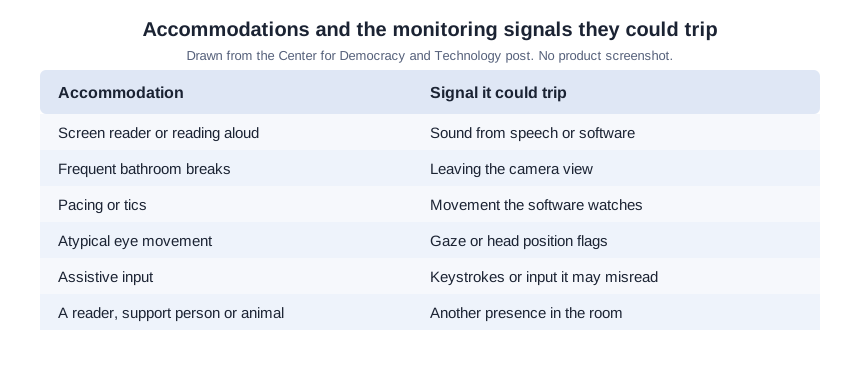
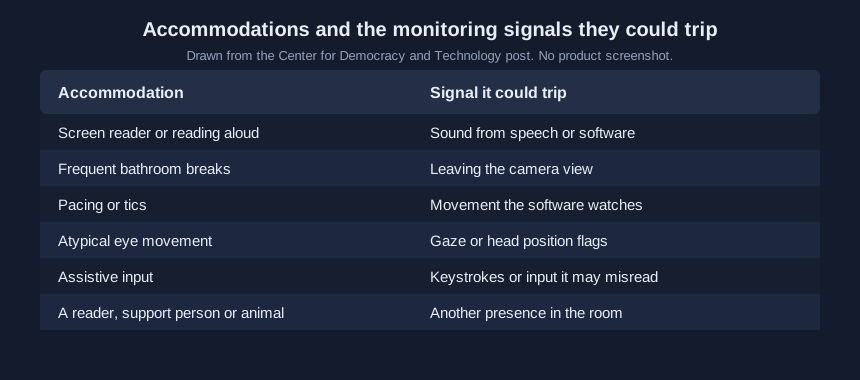
- Mark each accommodation that could set off an automated flag, and tell the people who review flags before the exam. The Center for Democracy and Technology warns that proctoring software could flag a blind candidate whose screen reader speaks aloud, or a candidate who needs to leave for the bathroom frequently, and names pacing, tics, atypical eye movement, assistive input, another person in the room and a service animal. Could set off an automated flag, with reviewers not told, is a VERIFY under R7.
-
Decide what happens when the face check fails. Have a person check ID before anyone is turned away. That is our rule, and a VERIFY under R8, never a STOP. The Center for Democracy and Technology warns that a failed face check could keep a candidate from the test.
-
Decide that no automated flag is acted on until a person has reviewed it with the candidate’s accommodation plan in hand. That is our rule, drawn from the research in our companion article, and a VERIFY under R9, never a STOP.
-
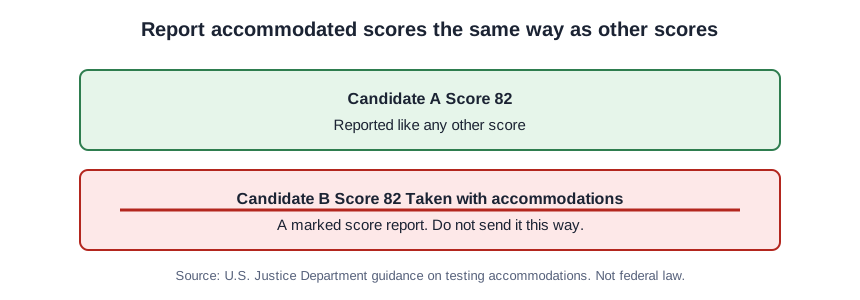
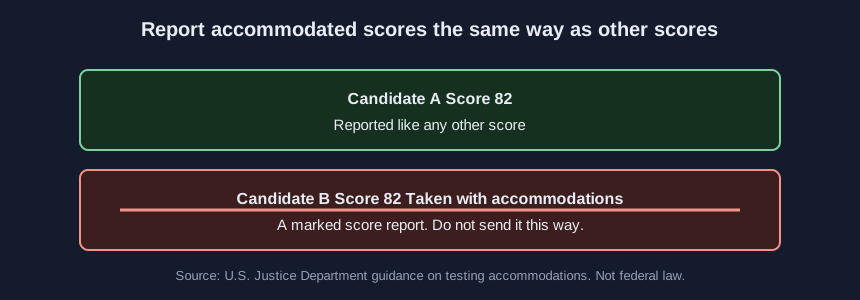
Check the score report. The Justice Department says accommodated scores should be reported the same way as other scores, and that flagging policies that impede people with disabilities from fairly competing are prohibited. That check comes from Justice Department guidance, not from the text of 28 CFR 36.309, and a marked score report is a STOP under R4.
- Run the lab on the list, fix each STOP, copy the record, and keep it with the exam file. The Justice Department says testing entities must ensure that test scores of people with disabilities accurately reflect their aptitude or achievement level.
One remote sitting at the Quennistow Board
This is a teaching example, not a case study. At the Invented Quennistow Board of Cost Estimators, six candidates with accommodations will sit one remote exam (Case F).
The lab’s record for Case F:
Invented Quennistow Board of Cost Estimators, remote exam accommodation check, Nov 21 2026, Case F: STOP 3, VERIFY 2, PASS 1
Row 1 (Candidate 1, extended time): STOP R1
Row 2 (Candidate 2, screen reading technology): VERIFY R6, also R7
Row 3 (Candidate 3, a qualified reader): STOP R3, also R7
Row 4 (Candidate 4, medication during the exam): STOP R4
Row 5 (Candidate 5, extra breaks): VERIFY R9
Row 6 (Candidate 6, distraction-free room): PASS
Invented examples for practice. Not legal advice.
Check your list against the six cases
Work each case out yourself, then open it in the lab.
- Case A: 0 to stop, 0 to verify, 6 that pass
- Case B: 0 to stop, 2 to verify, 4 that pass
- Case C: 2 to stop, 1 to verify, 3 that pass
- Case D: 2 to stop, 2 to verify, 2 that pass
- Case E: 0 to stop, 3 to verify, 3 that pass
- Case F: 3 to stop, 2 to verify, 1 that pass
The lab counts nine rows, across all six cases, that match more than one rule.
The approval that never reaches the proctoring setup
Skipping the accommodation added after the first notice went out. It still has to be on the list.
Treating an automated flag as a finding. An automated flag is a reason for a person to look, with the plan in hand.
Treating a PASS as proof the exam complies with the ADA. This tutorial and the lab are not legal advice, and these fields check some, not all, of the ADA rules on exams. R8 and R9 are our rules. R4 stays a STOP because of Justice Department guidance, not because the lab treats that guidance as federal law.
Sources (3)
- U.S. Department of Justice, Civil Rights Division: ADA Requirements: Testing Accommodations (originally issued September 8, 2015; last updated February 28, 2020; government guidance)
- 28 CFR 36.309, Examinations and courses (U.S. federal regulation; read on eCFR, current as of November 12, 2026)
- Center for Democracy and Technology: How Automated Test Proctoring Software Discriminates Against Disabled Students (November 16, 2020; nonprofit commentary)