Tutorial
BeginnerTest an AI-Written Spreadsheet Formula on Rows Where You Already Know the Answer
Before an AI-written formula drives invoices or transcripts, write the rule in plain words, build one test row for each kind of case, work out each answer by hand, compare it with the formula, have someone else look, and keep the record with the sheet.
Time needed: About 20 minutes for one formula
Before you start:
- A spreadsheet formula drafted with help from a chatbot or a spreadsheet's built-in AI helper
- The written rule the formula is meant to follow, such as a fee schedule
AI Literacy Data Quality Finance Events
You asked a chatbot for a registration fee formula, pasted it in, and the first few rows look right. Test it now, before it feeds invoices or refunds: build a handful of rows where you already know the right answer, and see whether the formula agrees. Ordinary rows rarely catch a wrong formula. The mistakes hide at the edges: the cutoff date, the member type nobody mentioned, the empty cell.
Try it now: the spreadsheet formula test lab runs a registration fee formula on test rows you build, compares each result with the answer you worked out by hand, and checks that you tested a typical row, a cutoff date, every member type and a blank cell. It marks each row PASS or STOP, flags missing kinds of rows, and builds a plain-text record to keep with the sheet. The Lakeshore Society of Hospital Pharmacists, its fees and both formulas are invented for the lab; neither formula is output from an AI tool.
The model we borrow
The AQuA Book is UK government guidance for analysts, revised in 2025. It is not a rule for associations, but its habits fit a fee sheet well. It separates two questions: “Analytical quality assurance is more than checking that the analysis is error-free and satisfies its specification (verification). It should also include checks that the analysis is appropriate and fit for the purpose for which it is being used (validation).”
It wants a second pair of eyes: “The assurer and the analyst shall be independent.” The builder still checks too: “This does not mean that the analyst should not undertake assurance, rather that there shall also be some formal independent assurance.”
The guidance describes black box models this way: “Black box models’ internal workings are not visible, easily understood, or succinctly explained.” You cannot see why a chatbot wrote its formula, but you can see what the formula does on rows you understand.
Test the formula
- Write the rule first. Before you read the formula, write it plainly. For example: Members pay $295 and Nonmembers $395, with $50 off for anyone in those two groups who registers on or before March 15, 2027; Students pay $95 flat; a row missing its member type or date should show CHECK.
- List the kinds of row the rule has. At minimum: typical, exactly on each cutoff, each member type, and a blank input. The AQuA Book names “boundary analysis” among its verification techniques; a cutoff-date row is that idea applied to fees.
- Work out each answer by hand. Write each row’s right result from the rule before you see the formula’s output, or its answer will start to feel right.
- Run the formula and compare. Any mismatch means stop and find out why; never edit the hand answer to match.
- Have someone else look. Ask a colleague who did not prompt the chatbot to read the rule and your rows. Scale the effort to the stakes: “A previously untried method requires more assurance.”
- Keep the record with the sheet. The AQuA Book asks analysts to “record the verification and validation that has been undertaken, documenting any activities that are outstanding and noting what remedial action has been taken and its effect on the analysis”.
Worked example: an early-bird fee
Dana Okafor, an invented meetings coordinator, has a draft formula for the lab’s 2027 Annual Meeting. She builds four rows: a Member registering on 02/01/2027 (by hand: 245), a Nonmember on 03/15/2027 (345), a Student on 01/10/2027 (95), and a Member with no date (CHECK).
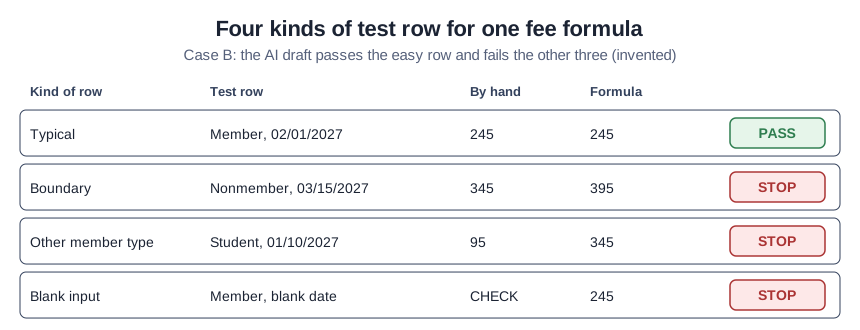
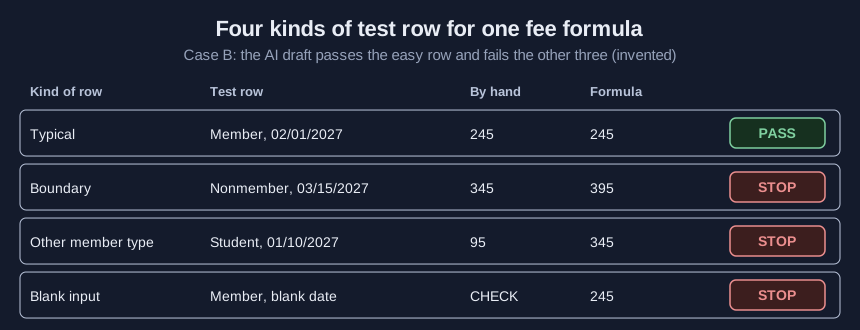
The draft gets only the typical row right. It uses “before” instead of “on or before,” skips Students, and treats the empty date as early. In many spreadsheet apps a blank cell compares as earlier than any date, so the blank row quietly gets the discount. The lab says: “Row 2: the formula gives 395, your hand-worked answer is 345. Do not use this formula until you know why.”
On two ordinary rows, the draft passes both. The lab’s coverage check catches that with lines such as “No blank input row tested. Add one and work out its answer by hand.”
The lab loads six cases:
- A, clean: corrected formula, all four kinds. PASS.
- B, seeded AI draft: the draft above. STOP.
- C, easy rows only: the draft on two typical rows; three kinds missing. FIX.
- D, missing hand answer: STOP, with “Row 2: no hand-worked answer. Work out the right fee by hand before you look at the formula’s result.”
- E, coverage gap: no blank row. FIX.
- F, no rows: STOP.
Check your result
- The rule is written in plain words.
- Every kind of case has a test row, including each cutoff and a blank cell.
- Every expected answer came before the formula ran.
- Every row matches, or the formula was fixed and retested.
- Someone else has looked, and the record sits with the sheet.
Mistakes that spoil a formula test
Testing only the rows you had. Real data is mostly typical. Add the edge rows yourself.
Rounding toward the formula. In whole-dollar fees, a near match is a mismatch.
Running out of time. The guidance is practical: “In cases with significant time and resource constraints, it may not be possible to do as much assurance as desirable. In these situations, addressing the areas of greatest risk should take priority.” For a fee sheet, that usually means the cutoff dates and the member types the prompt never mentioned.