Article
BeginnerAn AI Accessibility Widget Does Not Make Your Association's Website Accessible
What the FTC alleged about one AI accessibility widget, what its consent order now bars, and what that means for renewal, registration and payment pages.
Accessibility Website Communications Vendors AI Literacy
The offer tends to arrive inside a web agency proposal or a cold sales email: add one line of code, pay a monthly fee, and an AI tool makes the association’s website accessible. Before anyone signs, it is worth knowing how accessibility specialists rate tools like this, and what federal regulators said when one vendor made exactly that promise.
This is general information about one FTC matter, not legal advice.
How specialists rate automated fixes
In WebAIM’s January 2021 survey of 758 web accessibility practitioners, an uncontrolled sample, 466 of the 676 who rated overlays, plugins and widgets that automate accessibility changes called them not very or not at all effective.
That number needs its limits stated plainly. WebAIM says of its own survey that “The sample was not controlled and may not represent all web accessibility practitioners.” The question covered the whole category of automated overlays, plugins and widgets rather than any one product, and the survey is a few years old. Read it as the opinion of people who do accessibility work, not as a measure of every tool or every website.
For a communications or web desk, the useful takeaway is narrow. The specialists most likely to review your site, or to help a member who could not renew, are not inclined to treat an installed widget as evidence that the site works. That is our reading of the survey, and it is enough reason to ask harder questions before buying.
What the FTC alleged about one widget
The case that gives those questions weight involves an AI accessibility widget vendor. In the FTC’s complaint, the agency alleged that the vendor sold its widget from 2019 as an “AI-powered web accessibility solution” and claimed that installing its “one line of code” made a site compliant with 30% of WCAG requirements immediately, with an AI process handling the remaining 70% within 48 hours. WCAG, the Web Content Accessibility Guidelines, is the technical standard the complaint uses as its yardstick. The FTC also alleged, in the same complaint, that the vendor promised re-scanning a site every 24 hours kept it compliant as content changed.
The complaint measures compliance against a strict test: “For a website to be compliant with WCAG, all elements on the website must satisfy all relevant Success Criteria.” Against that bar, the FTC alleged that in a number of instances the widget failed to make basic parts of a page, such as menus, headings, tables, images and recordings, compliant and accessible to people with disabilities. The FTC alleged that the vendor’s own testers, in manual tests of sites running the widget, found errors on nearly all of the websites they tested.
Coverage was another problem. The FTC alleged in the complaint that each subscription covered a single web domain, and that when sites linked out to other domains to complete a purchase or a reservation, those pages did not carry the widget and in some instances were not accessible. It also alleged that the vendor did not adequately disclose that, unless extra services were bought, the widget did not make documents, PDF, Word, PowerPoint and Excel files, audio or video accessible. Finally, the FTC alleged that the vendor paid for advertisements dressed up as impartial reviews and articles.
One detail matters for anyone who never chose such a tool. The FTC alleged in the complaint that the vendor also sold through web developers, designers and agencies that offered the widget to clients “either as an included or add-on service.” Your site could already be running something similar because it came bundled with a redesign.
What the order requires, and what it leaves alone
The FTC’s Decision and Order, issued April 21, 2025, is a consent order. The companies “neither admit nor deny any of the allegations in the Complaint,” except as the order itself states, so everything in the section above remains an allegation, not a finding.
Under the order, the vendor may not claim that its AI and other automated technology can make any website compliant with WCAG, or that it “can ensure continued automatic compliance with WCAG over time as website content changes,” unless the claim is not misleading and the vendor has “competent and reliable evidence” behind it. If the vendor claims the product can correct accessibility barriers, it must disclose “clearly and conspicuously, and prior to the consumer incurring any financial obligation,” that the product will not correct barriers on third-party web domains or on “subdomains that may be part of the overall user experience, unless those domains also use the product.” The vendor agreed to pay the FTC.
The order is about advertising claims. It says nothing about what any association is required to do for its own website.
Where your members actually finish their tasks
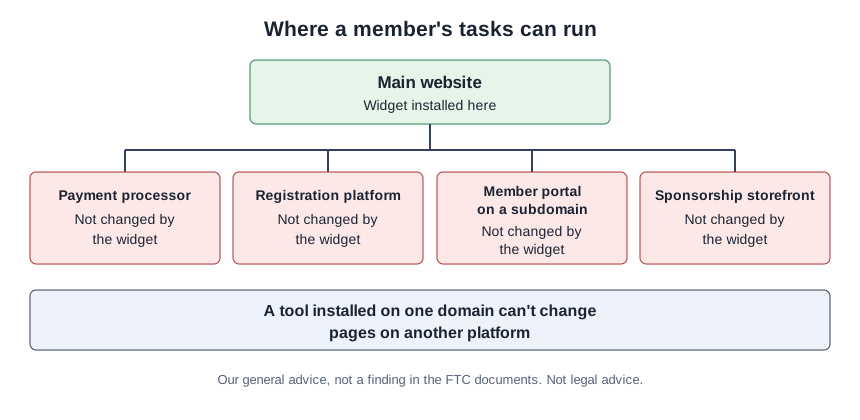
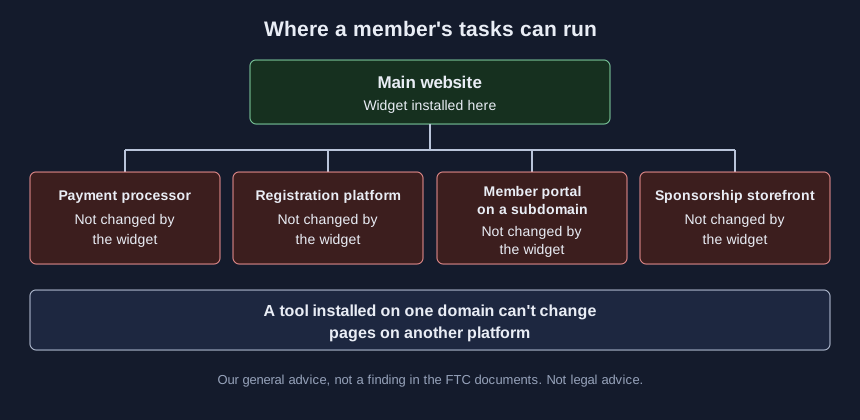
What follows is our general advice, not something either FTC document says about associations. The tasks members care about most, such as renewing and paying dues, signing in, registering for the conference and reading the exhibitor prospectus, often finish somewhere other than the main website: a payment processor, a registration platform, or a member portal on a subdomain. A tool installed on one domain can’t change pages on another platform. The same goes for exhibitors: if booth sales run through a sponsorship storefront hosted by someone else, a prospectus page that reads well on your site does not help a buyer who cannot complete the checkout.
Documents deserve the same suspicion. Associations publish bylaws, annual reports, prospectuses and continuing education handouts as PDFs and slide decks, and the fact that a page looks better with a widget switched on says nothing about the files it links to.
Three questions to put to any vendor in writing
- Which of our member tasks does this cover, step by step, and on which domains? Ask for the answer per task, including the payment, registration and portal steps.
- What evidence supports any claim that the product makes our site conform, and who produced it? A demo on the vendor’s own site is not evidence about yours.
- Are documents, audio and video covered, or are they a separate service?
Our general advice: whatever the answers, keep any conformance language off your accessibility statement unless a full evaluation backs it. For questions that apply to AI vendors in general, our buyer’s guide to AI vendor wrappers is a good place to start.
What this case does not settle
This is one vendor, one complaint and one consent order. It does not say that every overlay fails, that every widget is deceptive, or that any particular law requires your association to meet WCAG. What it does show is how far a “one line of code” promise can sit from what the FTC alleged about real sites, and why a member task has to be tested where it actually happens. Our companion tutorial on testing each member task on your website for accessibility walks through that test with a lab you can practice on.
Sources (3)
- WebAIM: Survey of Web Accessibility Practitioners #3 Results (survey conducted January 2021)
- Federal Trade Commission: Complaint, In the Matter of accessiBe Inc. and accessiBe Ltd., Matter No. 222-3156
- Federal Trade Commission: Decision and Order, In the Matter of accessiBe Inc. and accessiBe Ltd., Docket No. C-4817, issued April 21, 2025