Tutorial
BeginnerCheck a Member Comment Campaign Before It Is Submitted
Before you send a batch of member comments to an agency, record who approved each one, who wrote it, whether it has first-hand detail, how much it matches another comment, leftover placeholders, and whether the facts were checked.
Time needed: About 30 minutes for six comments
Before you start:
- The comments queued for submission, with the name attached to each one
- A record of whether each named member approved sending it
- The rule text, so you can check facts and any questions the agency asked
- A browser to run the lab
Advocacy Communications AI Literacy Member Trust
When you finish, you will have reviewed every comment queued for an agency, recorded whether the named member approved it, who wrote it, how much first-hand detail it carries, how closely it matches another comment in the batch, whether leftover placeholders remain, and whether its facts were checked against the rule. Every row gets a STOP, FIX or PASS before anything is submitted.
Try it now: in the member comment campaign check lab, six practice cases wait for you, each one a batch of six queued comments written for an association that does not exist. Enter the details for a row and the lab answers with a STOP, FIX or PASS verdict. The page does all of this on its own. Nothing is transmitted and no AI takes part.
Why check the batch, not just the count
Recommendation 2021-1 from the Administrative Conference of the United States tells agencies how to handle mass, computer-generated, and falsely attributed comments in rulemaking dockets. ACUS wrote that guidance for agencies, not for the groups that send comments. Using its three categories to review an association’s comment batch before filing, and treating an unedited AI draft as computer-generated, is our reading, not an ACUS instruction.
The recommendation defines three kinds of comments. Mass comments are “comments submitted in large volumes by members of the public, including the organized submission of identical or substantively identical comments.” Computer-generated comments are those “whose substantive content has been generated by computer software rather than by humans.” Falsely attributed comments are “comments attributed to people who did not submit them.”
Those categories matter to a sender because agencies “should flag any comments they have identified as computer-generated” and “should provide opportunities” for people “whose names or identifying information have been attached to comments they did not submit” to ask that a comment “be anonymized or removed from the online rulemaking docket.” A batch that arrives with your campaign attached can create those problems in public. That last point is our reading.
If you are still writing the alert that asks members to comment, our tutorial on turning a bill into a member alert covers that earlier step.
Eight steps
- Export the queued comments and work from that list, not from a count of how many names you hoped to collect.
- Confirm consent for every name. Falsely attributed comments “can harm people whose identities are appropriated and may create the possibility of prosecution under state or federal criminal law.” If the named member did not approve sending the comment under their name, do not send it.
- Mark who wrote each comment. Use M when the member wrote it, A when a tool drafted it and the member edited the draft, or G when a tool generated it and the member did not write or change it.
- Count the sentences that describe the member’s own situation. The recommendation notes that false attribution may “diminish the informational value of a comment, especially when the commenter claims to have situational knowledge.”
- Note how much of the text matches another comment in the batch. If many comments say the same thing, agencies “may welcome” a comment “with multiple signatures rather than separate identical or substantively identical comments.”
- Look for leftover placeholders, such as unused brackets standing in for a name or a detail, and count them. Checking for leftover template text is a teaching choice; the recommendation does not set that test.
- Check the facts against the rule and answer any specific questions the agency asked. Agencies “that have specific questions or are aware of specific information that may be useful should identify those questions or such information in their notices of proposed rulemaking.”
- Type the rows into the lab and act on every STOP and FIX. Change the comment, then re-enter the row until it is PASS. Practice on cases A through F until you can call each verdict before the lab shows it.
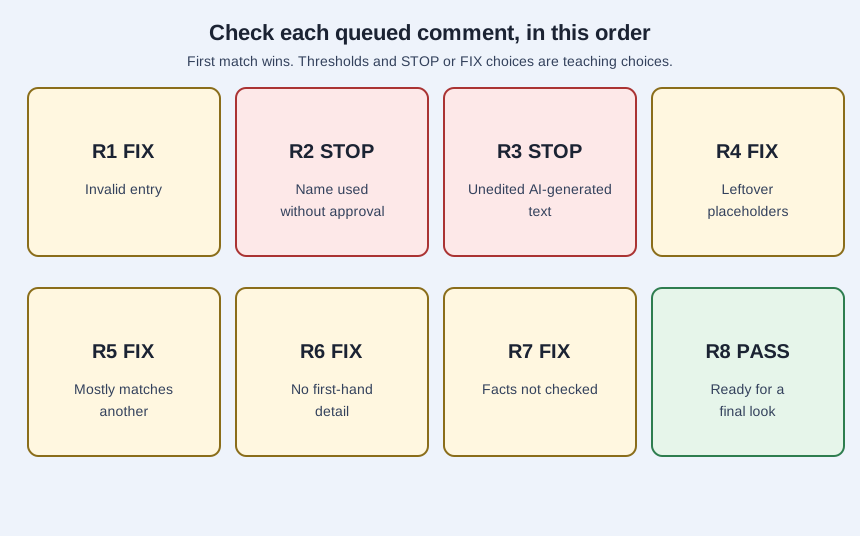
The thresholds, including an 80 percent match line and a zero-sentence line for first-hand detail, the choice of STOP or FIX, and the rule order are teaching choices. The recommendation supplies the categories, not those cutoffs.
Walking through one row
Case B, Row 2 is the row to study. Its comments were invented for the Invented Velmorrow Association of Home Health Agencies, a body that exists only in this lab, so read it as a teaching example, not as a case study. The named member has not approved sending the comment (N). Who wrote it and the other fields are otherwise filled in.
That row is a STOP under the consent rule, because the comment would be attributed to someone who did not approve it. The invented association should not send it.
Grade your own calls first
Work a case on paper first: call the verdict for all six rows, then compare with the lab, then change a single entry and see which verdicts move. Rows that trip several rules are tallied by the lab from the rules themselves each time, never from a stored list.
Case A passes all six rows. Case B stops two, sends one back for a fix and passes three. Case C passes three and sends three back. Case D stops one, sends two back and passes three. Case E stops two, sends two back and passes two. Case F stops one, sends three back and passes two.
A blank field is never read as 0. In Case C, Row 5, a blank first-hand-detail count is a FIX for a bad entry rather than a reading of “no detail.” In Case D, Row 5, a match of 79.9 percent passes the match line; 80 percent does not.
Where this check usually slips
Treating volume as the goal. The recommendation “does not address what role particular types of comments should play in agency decision making or what consideration, if any, agencies should give to the number of comments in support of a particular position.”
Assuming mass comments are themselves a problem. The recommendation “is not intended to imply that widespread participation in the rulemaking process, including via mass comments, is problematic.” Identical comments can often become one sign-on comment instead.
Assuming the agency cannot spot computer-generated text, or that it always can. “One particular problem that agencies may encounter is distinguishing computer-generated comments from comments written by humans.” They are told to flag what they identify. Do not count on either extreme.
Reading a page of PASS rows as proof the agency will give the comments weight. A PASS means one comment is ready for the member’s final look on this page.
Limitations
The lab checks only the entries you type; it does not read any comment or run any AI. The Invented Velmorrow Association of Home Health Agencies and its comments are made up. Recommendation 2021-1 did not study association campaigns, so this tutorial does not speak for current products.