Tutorial
BeginnerCheck an AI Translation With a Term List and a Back-Translation Before It Goes to Members
Before an AI-translated member notice goes out, check the numbers, names and approved terms, translate it back to look for dropped negations, and decide whether it needs a qualified translator. The steps are our recommended practice.
Time needed: About 15 minutes
Before you start:
- An English member communication and its AI translation
- A second AI tool, or a fresh session, for translating the result back to English
- Your glossary of program names, credential titles and approved translations, if you have one
AI Literacy Communications Translation Member Services
You have an English renewal notice, an AI tool has translated it, and you do not read the language. By the end of this tutorial you will have run five checks that work without reading the translation, and you will know whether the text can go out or must go to a qualified human translator first. The checks are our recommended practice.
Try it now: the translation term check lab takes an English source, its translation and a back-translation, plus a short list of names and terms. Pick the kind of content and press Check. The lab tests numbers, names, approved terms, negation words and risk, and marks each check PASS, FIX or STOP. Its Spanish samples are invented practice text with errors planted on purpose; they show how the checks work and are not translations to copy.
Why the check starts with numbers
A wrong digit is the easiest error to miss and one of the most costly. The National Center for State Courts, in its guide Machine Translation: Considerations and Cautions for Courts, gives the court version: “if the date of a hearing is incorrectly translated, a person could miss their hearing date and be subject to arrest or lose their case by default.” A renewal deadline or exam date that shifts by a day does the same kind of damage on a smaller scale.
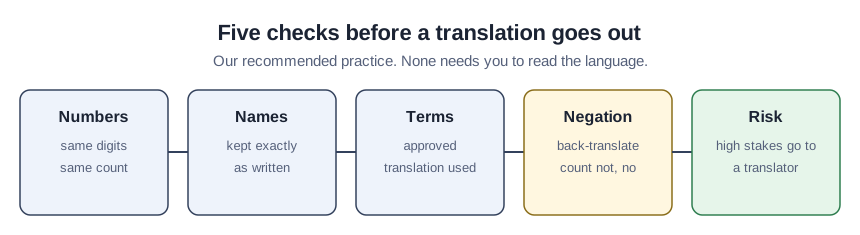
Five checks
- List every number, date, amount and name in the English. Include program names, credential titles and acronyms.
- Confirm each number appears in the translation the same number of times.
- Confirm names and do-not-translate terms appear exactly as written. Keeping names unchanged is our practice; follow your own style guide if it says otherwise.
- Check your term list. For each term of art with an approved translation, look for that exact phrase in the translation. The court guide reports that a study it cites found “the lack of use of precise legal terminology and difficulty rendering complex, multi-clause sentences” among the problems.
- Translate the result back to English and compare the negations. Use a different tool or a fresh session. Count the words such as not, no, never, without, unless and cannot in each version. If the back-translation has fewer, a negation may have been dropped. This word list and the back-translation step are ours, and a tool can repair an error on the way back, so a match is a screen, not proof.
Then decide who reviews it
The last decision is about risk, not wording. A federal health regulation offers a useful line. Under 45 CFR 92.201, when a covered health program uses machine translation for text “critical to the rights, benefits, or meaningful access of an individual with limited English proficiency, when accuracy is essential, or when the source documents or materials contain complex, non-literal or technical language, the translation must be reviewed by a qualified human translator.” That rule binds programs covered by the HHS rule, not associations. We use it as a benchmark: if your notice touches members’ money, deadlines, eligibility, health or legal standing, it goes to a qualified translator even when every check passes.
The court guide suggests tools can “create drafts of documents to be reviewed by professional translators.” For a high-risk notice, that is the role the AI version plays.
The worked example: a dropped negation
This is case C in the lab. The chapter, the notice and the Spanish are invented, and the Spanish is made up for practice with an error planted on purpose. It shows how the check works and is not a translation to use.
The English notice from the Maple Valley Chapter says: “Members who have not renewed cannot vote.” The translation was put back into English with a second tool, and the back-translation reads: “Members who have renewed can vote.”
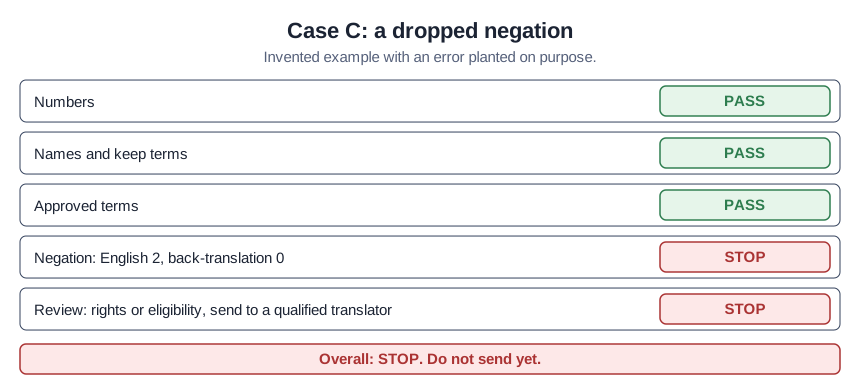
| Check | Result |
|---|---|
| Numbers | PASS |
| Names and keep terms | PASS |
| Approved terms | PASS |
| Negation | STOP: two negation words in the English, none in the back-translation |
| Review | STOP: rights or eligibility, send to a qualified translator |
| Overall | STOP: do not send yet |
Both negations vanished, and the sentence now says nearly the opposite of the policy. A notice about voting eligibility would go to a qualified translator in any case, but the check shows why. Case B in the lab plants a different error: the English says November 15 and the invented Spanish says 14 de noviembre, which the number check stops.
Check your result
- Every number and date in the English appears in the translation as often as in the source.
- Every name and program title is unchanged, and every listed term uses its approved translation.
- The back-translation keeps every negation word.
- Anything about money, deadlines, eligibility, health or legal rules has gone to a qualified translator.
Where a translation check goes wrong
Treating a clean back-translation as approval. It catches dropped words, not awkward or wrong-sounding ones. The lab cannot judge tone either.
Back-translating with the same tool and session. The tool may simply restore what it meant, hiding the error.
Sources (2)
- G. Spulak, National Center for State Courts: Machine Translation: Considerations and Cautions for Courts (2025; developed under State Justice Institute grant SJI-24P020)
- U.S. Code of Federal Regulations, 45 CFR 92.201, Meaningful access for individuals with limited English proficiency (HHS, Nondiscrimination in Health Programs and Activities)