Article
BeginnerAn AI Browser Assistant Can Read the Member Record You Have Open
In a 2025 audit of nine popular AI browser assistants, researchers found they often sent page content to their own servers, even on pages behind a login. What that means for staff.
AI Literacy Privacy Member Data Security
University researchers who audited nine of the most popular AI browser assistants, picked by installation numbers and tested on Chrome, report in their USENIX Security 2025 paper that “8 out of 9 extensions operate server-side.” For a membership coordinator with an AI helper in the browser, that finding is about the member record on screen as much as the question typed into the sidebar.
What server-side means at a membership desk
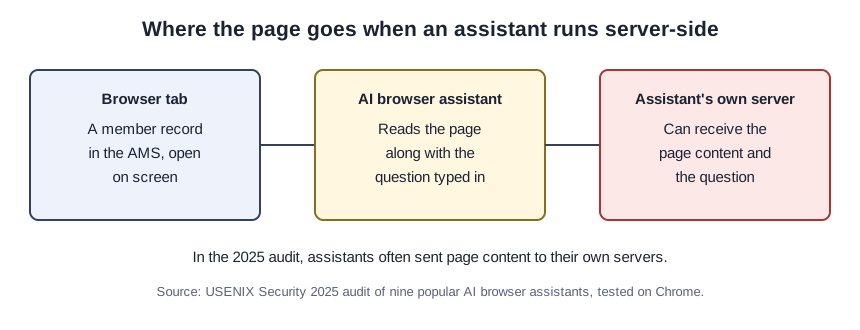
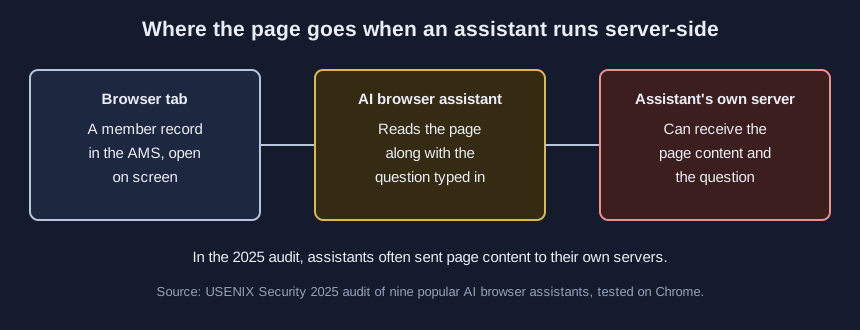
Server-side means the assistant does not answer on your computer. According to the same audit, the user’s question, the chosen model and “other metadata” go to the assistant’s own server.
Staff have long been told not to paste member data into a chatbot, and a browser assistant can make the paste unnecessary. The researchers found that these assistants “often collect and share full webpage content, including the HTML DOM and user form inputs in some cases, with their first-party servers,” as their paper puts it. The HTML DOM is the structure underneath the page, so it can hold everything you see on the screen and some things you do not.
That collection did not stop at sensitive pages. In the audit’s words, it happened “even on pages containing sensitive information, such as health records or personal information such as names or social security numbers entered in a web form.” The same researchers report that some assistants were “automatically invoked when a user enters a query on a search engine,” without anyone opening them, and that several “infer attributes (e.g., age, gender, income, interests) and use them to personalize responses across browsing contexts.”
The test looked a lot like a staff login
The team picked 20 commonly browsed kinds of website, half of them public and half private, and defined a private site as one that requires a login and holds information a person “would not want to be collected or shared,” according to the paper. They ran every site with every assistant, 180 experiments in all, according to the paper. In those private spaces, the authors write, use of the assistants “resulted in data collection ranging from partial webpage content to full DOM snapshots.”
The study did not test an AMS, a donor database or a member portal. We think those fit its definition of a private space closely, since each one sits behind a login and shows personal details, but that link is our inference and not the researchers’ finding.
The privacy policy may not mention the page
The natural next step is to read the assistant’s privacy policy. The researchers did that too, and compared the assistants’ policies with what the assistants actually did. They report “widespread noncompliance and incomplete disclosures across the policies,” and add that “none of them explicitly address the handling of webpage content that may contain such information, especially in private spaces,” per the audit.
Reading a tool’s own terms is still worth the time, and our October 26 walkthrough on what an AI tool keeps and trains on shows how to do it and keep a dated record. For a browser assistant, though, a clean policy tells you less than you might hope, because the open page is the part it may leave out.
Extensions reading pages is not new
None of this started with AI. In a 2018 study of browser extensions in general, not AI assistants, North Carolina State University researchers analyzed 178,893 extensions crawled from the Chrome Web Store between September 2016 and March 2018 and flagged 3,868 of them as potentially leaking privacy-sensitive information. The same 2018 paper explains that extensions can “inject code that retrieves private information from a web page (e.g., page URL, cookies, form inputs, etc),” and it found that the ten most popular extensions confirmed to be leaking had more than 60 million users combined.
We read that study as background only. It shows that extensions have been able to read the page for years, and the 2025 audit shows AI assistants using that reach on pages people would rather keep private.
Three moves before the next member call
- Keep AI browser assistants off pages with member or donor records until someone has checked what they send from those pages. That is our advice, drawn from the audit rather than stated in it.
- Do not treat the privacy policy as the answer. Given what the researchers found, a policy that says nothing about page content has not told you what happens to it.
- Find out what is installed. Our companion tutorial, Take Stock of the AI Extensions in Your Staff’s Browsers, goes through one browser extension by extension.
The researchers sum it up in one sentence: AI browser assistants “offer powerful capabilities but pose significant privacy risks due to their access to personal and sensitive user data,” as their USENIX paper concludes. For an association, the sensitive data is usually whatever page was open when someone clicked the helper.
Sources (2)
- Yash Vekaria, Aurelio Loris Canino, Jonathan Levitsky, Alex Ciechonski, Patricia Callejo, Anna Maria Mandalari and Zubair Shafiq (UC Davis; Mediterranea University of Reggio Calabria; University College London; Universidad Carlos III de Madrid): Big Help or Big Brother? Auditing Tracking, Profiling, and Personalization in Generative AI Assistants (34th USENIX Security Symposium, 2025; conference paper)
- Quan Chen and Alexandros Kapravelos (North Carolina State University): Mystique: Uncovering Information Leakage from Browser Extensions (2018 ACM SIGSAC Conference on Computer and Communications Security; conference paper, read as the authors' copy)